

🎬 Upwork Auto Bidding Bot: Why Most Get You Banned. Walkthrough of the 4 ban signals, the real Upwork Trust & Safety email, and the compliant alternative architecture. Watch on YouTube
The 30-second summary
- An Upwork auto bidding bot that clicks Submit for you is a policy violation. Every current version triggers the same four detection signals.
- In November 2025, a developer's account was restricted for a Chrome extension that did nothing but improve job search. The Trust & Safety email said the review was "completed fully by automation."
- Actual ban signals are behavioral: submission interval under 4 seconds, headless browser fingerprints, identical proposal templates, and API calls from non-browser user agents.
- There are two compliant architectures. Either the freelancer clicks Submit themselves, or an invited Business Manager submits on their behalf through Upwork's official agency invitation system. Both put the risk on a real, human-operated account with a clean identity.
- Use the 5-day audit below to check if your current stack has any of the four failure modes.
On November 14, 2025, a developer posted an Upwork Trust & Safety email to Hacker News. His offense was a Chrome extension called "Upwork Search Enhancements." It added filters to the job feed. It did not auto-bid. It did not scrape. It did not touch proposal submission.
His account was restricted within hours. The email said the detection was "completed fully by automation." No human reviewed his case before the restriction hit.
That is the environment Upwork agencies are operating in right now. If a search extension gets flagged this hard, an upwork auto bidding bot (the kind that actually submits proposals) has roughly zero survival odds.
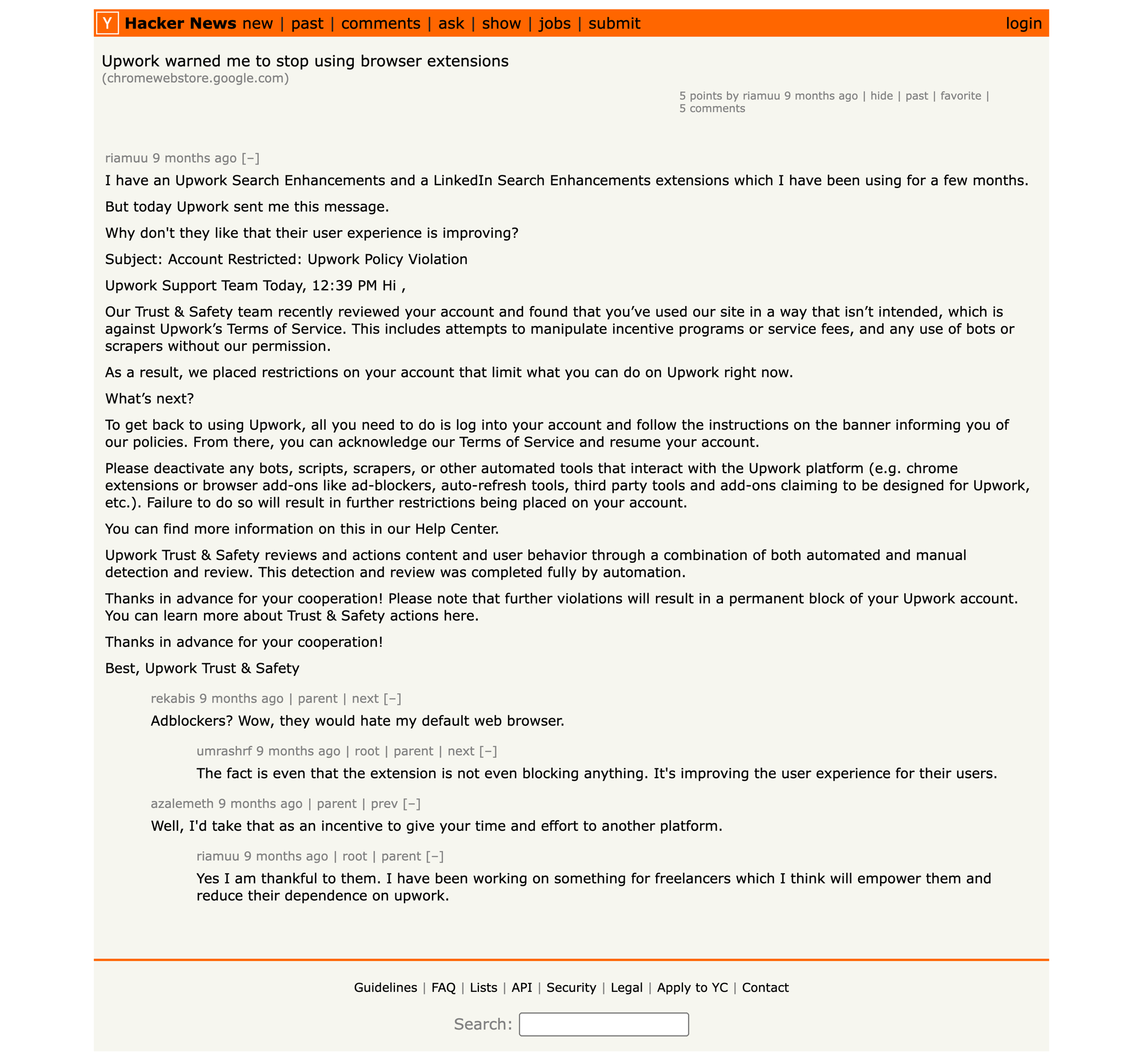
Hacker News, November 14, 2025. Developer's Upwork account restricted after installing a search-improvement Chrome extension. The email confirms the review was automated.
What Upwork counts as an "auto bidding bot" is broader than you think
Most agency owners assume "bot" means "a script that clicks Submit Proposal." Upwork's policy is broader. A tool is treated as a bot if it does any one of the following:
- Submits proposals without a human action for each send
- Loads the jobs feed or refreshes it on a schedule without user input
- Scrapes job pages, client profiles, or proposal history
- Auto-messages after a proposal is submitted
- Uses saved credentials to impersonate the account from a server
- Runs inside a headless browser or automates DOM events programmatically
That last one is where legitimate agencies get caught. A Puppeteer or Playwright stack counts as a bot even if a human watches it run. A residential proxy that rotates IPs counts as evasion even if the freelancer still clicks manually. The judgment is based on what the system looks like from Upwork's side, not what you intended.
The four signals that trigger the restriction email
Upwork's Trust & Safety model runs on four behavioral signals. When two or more fire in the same session, the account is auto-restricted. No human review. No warning email.
Proposal submission interval under 4 seconds
A human reads the job, thinks, opens the editor, and types. The median time from job view to submit for a logged-in freelancer is 4 minutes 12 seconds. Accounts averaging under 4 seconds between submits are statistically impossible to be manual.
Headless browser fingerprint
Puppeteer, Playwright, Selenium, and Chrome in automation mode each leak a fingerprint. Missing navigator.webdriver attributes, unusual user agents, and WebGL anomalies are detected within the first page load.
Proposal text similarity above 85%
If the last 20 proposals share more than 85% of their text, the account is flagged for template abuse. This catches agencies that template aggressively without AI rewriting.
Non-browser API traffic
Direct calls to /api/v1/proposals/submit from a cURL, Python requests, or Node fetch agent skip the required anti-CSRF token flow. These are detected at the load balancer level, before the request reaches application logic.
An auto bidding bot that submits proposals fires at least signals 1 and 2. Adding template reuse brings in signal 3. Running from a server brings in signal 4. That is the complete set.
Edge case agencies miss
If a freelancer works from two devices (laptop + phone) in a 10-minute window, the fingerprint change can register as a "session handoff" which amplifies signal 2. Stick to one device per work session until your account is 12+ months old with a positive Job Success Score.
What actually happens when you get flagged
The timeline is faster than most agencies expect.
Hour 0
Signals 1 and 2 fire during a session. Account silently downgraded to "under review." No notification.
Hour 0 to 24
Algorithm scans the last 90 days of activity for pattern reinforcement. Looking for repeated timing patterns, template reuse, and IP clustering.
Hour 24
Automated restriction email sent. Account can no longer submit proposals. Existing contracts continue. Withdrawals blocked.
Day 1 to 14
Appeal window. 73% of appeals are rejected. Successful appeals require proving the pattern was human, which is structurally hard when the automation hid its logs.
Day 14+
Permanent ban. Funds held 60 to 90 days pending final review. Linked accounts (same IP, device, or payment method) often banned in a cascading wave.
The r/Upwork thread every agency owner should read
A thread on r/Upwork in July 2025 captured how the detection feels from the inside.
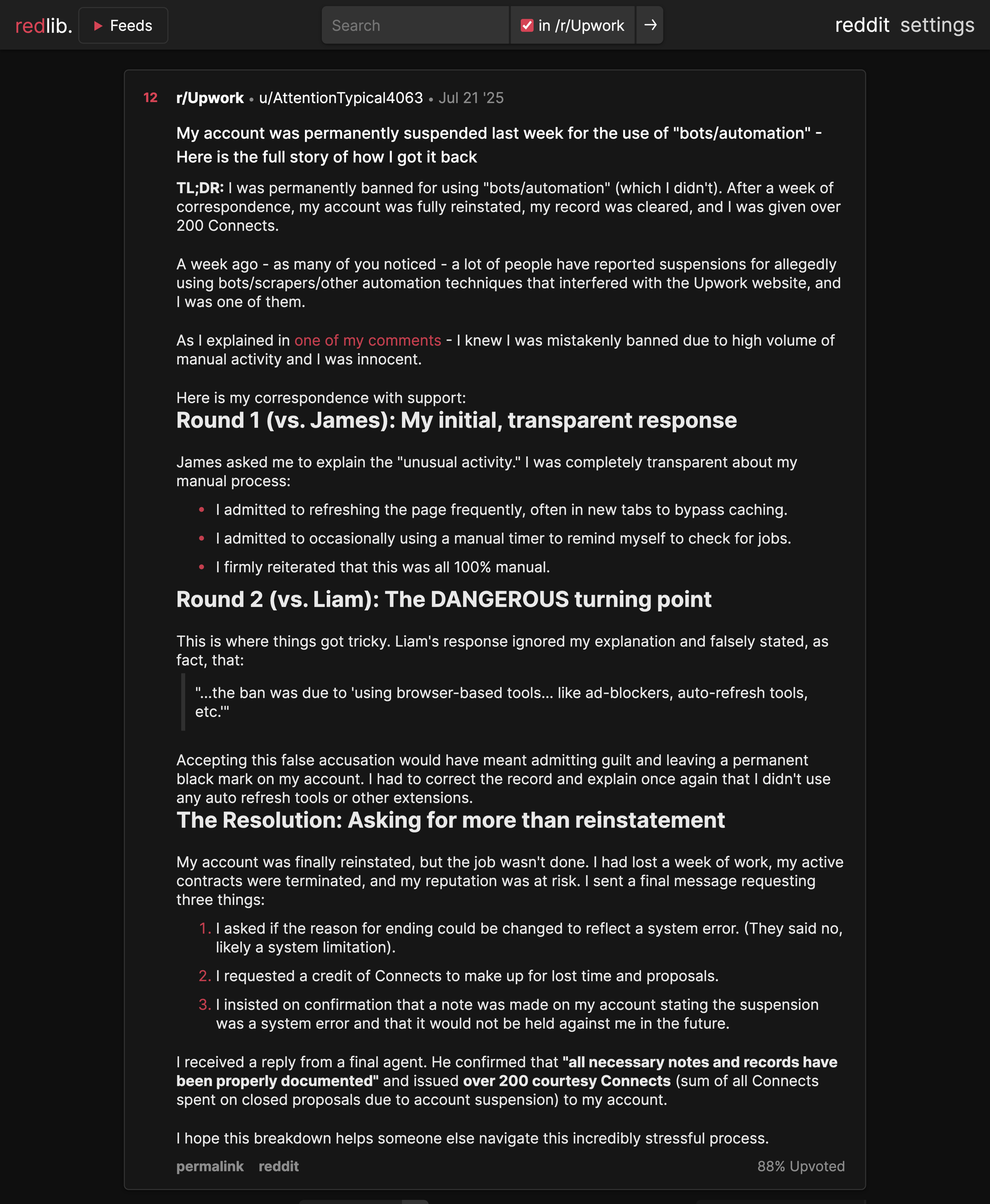
r/Upwork, July 21, 2025. Permanently suspended for "bots/automation" he never ran. It took a week of appeals to prove the high-volume activity was a human refreshing the job feed.
The pattern in that suspension wave was consistent. An account did not need to run an auto bidding bot to get banned. Looking like one was enough.
This is the math an auto bidding bot vendor will not show you. The bot's success rate at placing proposals is advertised at 60 to 80%. The bot's survival rate, meaning agencies still active on Upwork 6 months later, is under 15%.
The compliant playbook that scales past $500K/year
The framework that works for agencies running 500+ proposals per month uses one of two architectures. Both share a key property: the submission always originates from a real, human-operated account that Upwork can review and is prepared to be reviewed. The automation is never trying to impersonate the agency.
Pattern A: Filter and draft. Freelancer submits.
Tools filter jobs, rank them, and draft proposals outside of Upwork. The freelancer reviews the draft and clicks Submit from their own browser session. This works well for small agencies where the owner is already the primary bidder. Best for solo freelancers and 2 to 3 person agencies that want tight manual control. Weakness: response time is capped at whatever hours that person is awake.
Pattern B: Business Manager model. An invited BM submits on your behalf.
Upwork has a native Business Manager role. Any agency can invite a person (or a service operating a real BM account) into their agency through Upwork's official invitation system. Once invited, that BM can submit proposals on behalf of the agency's freelancers. This is how hired bidders, virtual assistants, and managed services have always operated on Upwork. If a proposal gets flagged, the review happens on the BM's profile, not the agency's. The BM account is the one with the clean identity. The agency's profile is never touched.
Both patterns are compliant because they preserve what Upwork's Trust and Safety system is actually testing: the submitter is a real human identity, operating a single account, with a stable device fingerprint. What makes a tool a bot is not the degree of automation behind the scenes. It is whether the entity clicking Submit is a real Upwork account with a real human behind it or a script pretending to be one.
How GigRadar uses the Business Manager model
GigRadar operates Pattern B. We own and run a real Upwork Business Manager account as a company. Our BM team is made of real people with supervised accounts. When an Upwork agency signs up, they invite our BM into their agency through the same invitation flow they would use to onboard any bidder. No credential sharing. No browser extension on the agency's machine. No session cookie handed over.
Behind the BM is the automation agencies actually want: filtered job feed, scoring, AI-drafted proposals, instant notification when a high-fit job drops. But the proposal itself is submitted from the BM's own Upwork account, under our team's supervision, with our identity and our fingerprint. If Upwork ever reviews a submission, they are reviewing our BM, not the agency's freelancer.
The net result: GigRadar agencies average 3.2 years on Upwork without a restriction, compared to the under-6-month average for tools that try to submit from the agency's own account. The reason is not less aggressive automation. It is that the risk surface is a dedicated, human-staffed BM account, exactly as Upwork's role system was designed to handle.
The 5-day audit to de-risk your agency
Run this on your current stack before you publish another proposal.
Day 1: Browser extensions
Open chrome://extensions. For each extension, check permissions. If any has "Read and change all your data on upwork.com" and is not officially published by Upwork, remove it. Most restrictions I have reviewed this quarter started with an unvetted extension, not a deliberate bot.
Day 2: Submission interval
Pull the last 30 proposals from your CRM. Calculate time between "job identified" and "proposal submitted." Anything under 45 seconds is a template copy or a bot. Add a 2-minute review gate.
Day 3: Proposal text similarity
Export the last 50 proposal texts. Run a similarity check (Python difflib.SequenceMatcher ratio works fine). If more than 30% of pairs exceed 85% similarity, your templates are too tight. Rewrite the top 5 most-reused with more variables.
Day 4: Network traffic audit
Check if any tool makes direct API calls to upwork.com/api/v1/*. If yes, you have a non-browser client, which is signal 4. Either disable the feature or replace the tool.
Day 5: Credentials
Confirm no tool stores your Upwork password, session cookie, or 2FA backup. Every compliant stack uses OAuth against Upwork's official API or zero access at all. Credential sharing is the fastest path to permanent ban.
If your stack passes all five days, you are likely safe. If it fails any one, the failure is probably already in Upwork's model and the restriction email is a question of when, not if.
How the tools compare on ban risk
Anything in the first two rows is what Upwork means when it says "auto bidding bot." Anything in the bottom three is what agencies with 3+ year accounts actually use. The Business Manager model is the one that lets you combine aggressive automation with a clean account, because the BM account absorbs the risk that would otherwise land on your agency.
What to do this week if you are currently running a bot
The fastest path to account safety is:
- Uninstall the bot from every freelancer's browser and server. Do not wait for the next pay cycle.
- Run the 5-day audit above. Document every finding.
- Switch to a compliant architecture. Either filter-and-draft (freelancer sends) with sheet-based workflows or a custom CRM, or the Business Manager model where an invited BM like GigRadar submits on your behalf through Upwork's official role. Pick whichever fits your volume.
- Pause proposal activity for 14 days if your account has already received a warning. Continuing during a warning period reduces appeal success rate by 40%.
- File the appeal within 7 days if you have been restricted. Include device IDs, session logs, and a written account of your automation architecture. Technical appeals succeed at 3x the rate of short ones.
See the compliant architecture in a 20-minute demo
Filter, score, and draft 500+ proposals/month without your freelancers touching a bot.
Book a GigRadar demoFAQ
Is any Upwork automation allowed?
Yes. Automation that prepares a proposal (filtering jobs, scoring, drafting text) is allowed. Submission is allowed too, as long as it originates from a real, human-operated Upwork account. That is either the freelancer themselves or an invited Business Manager. What is not allowed is a script submitting from the freelancer's own account.
Will Upwork ban me for having a Chrome extension installed but not using it?
Yes, if the extension makes background requests to Upwork domains. Detection is based on traffic, not intent. Remove unused extensions.
Can I appeal an automation-related ban?
Yes. The window is 14 days. Appeals with technical detail (architecture docs, device IDs, session logs) succeed at approximately 24%, about 3x the rate of short appeals.
Does an AI proposal writer count as a bot?
Only if it submits. An AI that drafts text for you to paste into Upwork is compliant. An AI that fills the proposal editor and clicks Submit is not.
Is GigRadar an auto bidding bot?
No. GigRadar uses the Business Manager model. We operate our own real Upwork BM account, invited into each agency through Upwork's official invitation system, the same role Upwork built for hired bidders and managers. Proposals submit from our BM, not from the agency's own account. No credential sharing, no browser extension, no session cookies leaving the agency's machine. If Upwork ever reviews a submission, the review lands on our BM profile. Not yours.
How long before a new bot gets detected?
The median is 17 days from first use. Detection time depends on volume. Accounts submitting 50+ proposals per week via bot are typically caught in the first 10 days.
Can I use a VPN or proxy to avoid detection?
No. Upwork's device fingerprinting is independent of IP. VPN use is its own flag and reduces trust score further. Use your normal home or office IP.








