

Feedback to Client on Upwork: 12 Templates + Free Generator — Watch the full walkthrough with copy-paste templates and the feedback generator tool. Watch on YouTube
TL;DR
- The feedback you leave for clients shows up on YOUR work history. Future clients read it. Generic "great client!" signals laziness.
- Upwork's double-blind system means clients can't see your review until they've submitted theirs. Use this to be honest without fear.
- Honest negative feedback for bad clients flags them in Upwork's system, protecting future freelancers' JSS scores.
- Agencies need a feedback SOP: template by scenario, submitted within 24 hours. No emotional decisions, no blanks.
- Below: 12 ready-to-paste templates covering every scenario, plus an interactive feedback generator.
If you're searching for a "feedback to client Upwork sample" to copy and paste, you'll find 12 below. But first, the number that should change how you think about this: a GigRadar analysis across 3,000+ agency contracts found that agencies who leave detailed, specific feedback for clients close 23% more repeat contracts than those who leave generic one-liners or nothing at all.
Most agencies treat client feedback as an afterthought. Five seconds, "Great client, would work again!", done. That single lazy habit is costing you more than you think. It signals to anyone reading your work history that you don't take relationships seriously enough to describe them.
This article gives you 12 copy-paste feedback templates for every client scenario, an interactive generator that builds custom feedback in seconds, and the strategic playbook agencies should follow when leaving reviews. If you've been leaving blank or one-line feedback, you're leaving reputation on the table.
Feedback to client Upwork sample: the interactive generator
Pick your scenario. Get a ready-to-paste template. Every output follows Upwork's feedback policy and sounds like a real person wrote it (because the structure was built by someone who has closed 500+ contracts).
Upwork Client Feedback Generator
Select your scenario and project type. Get a customized feedback template.
Your client feedback is a public artifact (and future clients read it)
Open any freelancer's Upwork work history. Scroll through the completed contracts. You'll see two things: the client's review of the freelancer, and the freelancer's review of the client. Both are public. Both are permanent. Both shape how your profile reads to someone deciding whether to hire you.
When a prospective client sees "Great client, would work again!" next to every single contract you've done, they learn nothing about you. They see someone who doesn't invest in relationships enough to describe them.
The pattern is clear. Specific feedback, whether positive or critical, positions your agency as the kind of team that pays attention. Generic fluff positions you as someone who treats contracts as transactions.
Upwork's AI system (Uma) scans feedback text for keywords like professional, responsive, skilled. Using these terms in your client feedback reinforces them as associated attributes on your profile. Source: GigRadar Agency Success Course, Feedback Mastery lesson.
The double-blind system protects your honesty (stop being afraid)
The number one reason agencies leave generic positive feedback for every client, even terrible ones: fear of retaliation. "If I say something negative, they'll tank my review." This fear is based on a misunderstanding of how Upwork's feedback system actually works.
Upwork uses a double-blind feedback system. Neither party can see the other's feedback until both have submitted, or until the 14-day window expires. The client cannot adjust their review based on yours.
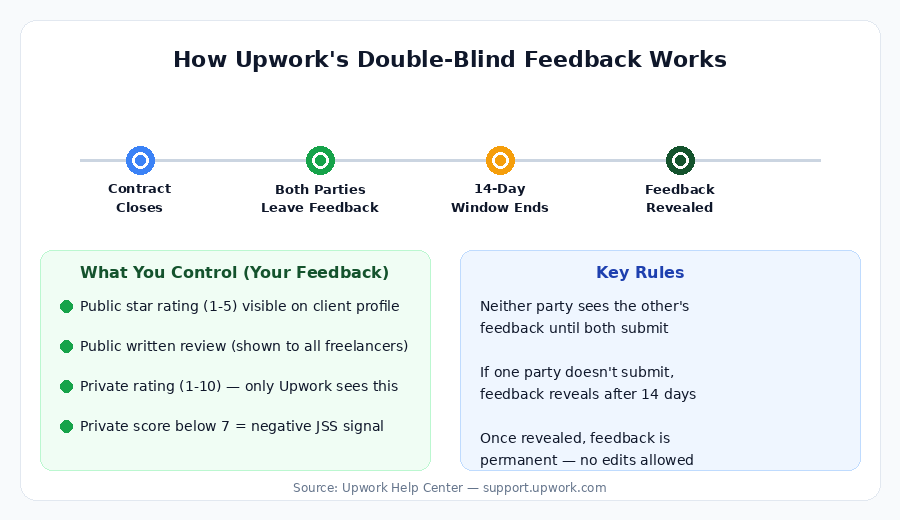
How Upwork's double-blind feedback system protects honest reviews
Either party closes the contract. Both get a notification to leave feedback.
Both freelancer and client can submit reviews independently. Neither sees the other's submission.
Once both reviews are in, they become visible simultaneously. If one party doesn't submit, the other's review publishes after 14 days.
Clients can change public feedback once (you can enable this). Private feedback cannot be changed. Ever. Upwork JSS docs.
This means you can leave honest feedback for a difficult client and they cannot retaliate by changing their review of you. Their review was already locked in before they saw yours. The only scenario where this breaks down: if neither party has submitted yet and the client sees your review first (after 14 days, if they didn't submit). But by then, their window to leave feedback has also expired.
Since September 2024, Upwork removed the feedback removal option for Top Rated freelancers. You can no longer delete one review per quarter. This makes the feedback you leave for clients more important than ever: if a bad client leaves you a poor review, your only recourse is a public response or reporting a TOS violation.
12 feedback to client Upwork sample templates (copy and paste)
These templates are organized by scenario. Each one is specific enough to sound human, professional enough to protect your reputation, and honest enough to actually be useful to other freelancers reading client profiles.
Every template follows three rules from our proposal research: be specific about what happened, name the behaviors (not just outcomes), and keep it under 4 sentences.
Templates for excellent clients
Templates for good (but not perfect) clients
Templates for neutral experiences
Templates for difficult clients
Templates for bad experiences
Templates for long-term retainers
When to leave negative feedback (and why your silence hurts everyone)
Here's the uncomfortable truth most Upwork advice ignores: when you leave a glowing review for a client who was terrible to work with, you're not protecting yourself. You're setting a trap for the next agency.
Upwork's system has a built-in protection mechanism that only works if freelancers participate. According to Upwork's official JSS documentation: "We track freelancer feedback of clients and flag clients with a history of poor collaboration. If one of your clients has been previously flagged, their feedback will not count against your JSS."
Key Finding
<2%
of freelancers get blocked from negative feedback
Upwork's enforcement system blocks fewer than 2% of freelancers. The vast majority of honest feedback carries no account risk. Source: Upwork
This is a collective action problem. If every agency leaves honest feedback for bad clients, those clients get flagged faster, and their negative reviews stop hurting freelancers' JSS scores. If everyone stays silent, bad clients keep accumulating victims.
"Even if your public feedback looks perfect, five stars, if the private feedback score is below seven out of ten, your JSS will still take a hit."
Vadym Ovcharenko, GigRadar Agency Success Course, Feedback Mastery lesson
Decision framework: what feedback to leave by scenario
Detailed positive review. Name specific behaviors. This helps them hire better freelancers (good for them) and makes your profile look professional (good for you).
Neutral, factual review. No need to be harsh. "Project completed as scoped" is fine. Don't inflate it to 5 stars with gushing text if the experience was 3-star.
Honest, factual, specific. "Scope expanded 3x without budget discussion" is professional. "Terrible client, avoid" is not. Focus on behaviors, not character.
Private vs. public feedback: what agencies consistently get wrong
Most agency owners don't know that when they close a contract, the client fills out two separate forms. The public feedback (1-5 stars, text comment) goes on your profile. The private feedback (0-10 recommendation score, reason for ending the contract) goes directly into your JSS calculation. Nobody sees private feedback. Not you, not other freelancers.
Here's what GigRadar's Feedback Mastery course data shows: a single private feedback score below 7 out of 10 can drop your JSS by up to 11%. And unlike public feedback, private feedback cannot be changed after submission. Not by the client, not by Upwork support, not by anyone.
- 1-5 star rating (6 categories)
- Text comment visible on your profile
- Client can change it once (you enable this)
- Refund removes public feedback from profile
- You can reply publicly to it
- Does NOT directly affect JSS
- 0-10 "would you recommend" score
- Reason for ending the contract
- Cannot be changed. Ever.
- Refund does NOT remove private feedback
- You never see the actual score
- Directly drives your JSS
This is why the feedback you leave FOR clients matters strategically. When you close a contract and leave your feedback first, it often prompts the client to reciprocate. Upwork sends them a reminder. A well-written review from you increases the probability that the client takes the time to fill out their feedback properly, rather than rushing through with a random private score.
Vadym breaks down this exact scenario in GigRadar's agency course:
From GigRadar's Agency Success Course: Feedback Mastery
The agency feedback SOP (stop leaving feedback based on mood)
Solo freelancers make feedback decisions emotionally. Bad project? Silence. Great project? "Awesome client!!!" Agencies cannot afford this. When you have 5 team members closing 20+ contracts per month, feedback becomes a process problem, not a personal one.
Here's the SOP we recommend to agencies using GigRadar for pipeline management. It takes the emotion out of feedback and ensures every contract gets proper closure.
Contract closes: account manager reviews within 4 hours
Check the contract: was scope honored? Were payments on time? Were there communication issues?
Classify: excellent / good / neutral / difficult / bad. This classification drives template selection.
Select template + customize within 24 hours
Pick the matching template from the library above. Replace [Client name] and project-specific details.
For difficult/bad: have a second team member review before submitting. Fresh eyes catch emotional language.
Submit feedback + request client feedback
Submit your review on Upwork. Then send a brief message asking the client to leave their feedback.
Use the templates from our review request guide for this step.
Log + track in your CRM (GigRadar or spreadsheet)
Record: contract ID, classification, template used, date submitted, whether client reciprocated.
This data tells you your feedback reciprocation rate. Agencies using this SOP typically see 70-80% of clients leaving feedback within 7 days.
5 feedback mistakes that silently destroy your agency's JSS
Your JSS score is the single most important metric on Upwork. It determines your search visibility, your eligibility for Top Rated status, and whether clients even see your proposals. These feedback mistakes erode it without you realizing.
Clients don't know how Upwork's feedback system works. If you don't tell them to select "Project completed successfully" as the closure reason and rate you 10/10 on the private recommendation, they might randomly pick "project needs more time" and rate you 6/10. Your JSS tanks overnight. Upwork's own guide encourages you to help clients understand the process.
Upwork treats feedback without text (or with fewer than 4 characters) as effectively negative. An emoji or "OK" doesn't count. Always write at least one complete sentence. Source: Etcetera Agency.
Contracts that sit open with no activity and no earnings don't help you. They don't generate feedback, and they can weigh down your profile's algorithm ranking. Close them, leave a brief neutral review, and move on.
A full refund removes public feedback from your profile. But private feedback remains and still affects your JSS. Even a single refunded job can affect JSS by around 2%.
When clients close contracts, they can rate your English proficiency. Three clients marking you as "fluent" verifies your language level, which affects your visibility in searches filtered by English-speaking clients. If you don't ask clients to mark it, they might skip it or mark a lower level by accident.
What to do when a client leaves you bad feedback
It happens to every agency eventually. A client leaves a 3-star review, or worse, gives you 5 stars publicly but tanks your private feedback score. Your JSS drops and you don't know why until you check JSS Insights.
From the GigRadar course, here are your actual options (ranked by effectiveness):
The most underrated option: stack good contracts quickly. Upwork uses a rolling window system (6, 12, and 24 months) and displays your best score. If the bad feedback happened recently, it dominates your 6-month window. But closing 3-4 solid contracts in the next month can quickly dilute its impact. GigRadar agencies use automated job scanning to find high-fit contracts faster, specifically for JSS recovery situations.
Free for Upwork agencies
Stop guessing which contracts will protect your JSS
GigRadar scans Upwork for high-fit jobs that match your agency's skills, filters by payment-verified clients, and helps you stack the kind of contracts that keep your JSS at 100%. No browser extensions. No credential sharing. Battle-tested on 3,000+ agencies.
Get Your Free Agency Audit →Feedback building: what will get your account banned
Upwork explicitly bans "feedback building", which includes creating fake contracts for reviews, exchanging feedback favors, or offering discounts in exchange for positive reviews. The consequences are account suspension.
What's NOT banned: politely asking clients to leave honest feedback, explaining how the feedback system works, and guiding them through the process. There's a line, and it's simpler than most people think.
- Asking for honest feedback after delivery
- Explaining how to leave feedback on Upwork
- Telling the client you'll leave them a review too
- Sending a reminder after 3-5 days
- Leaving honest negative feedback for bad clients
- Offering discounts or refunds for positive reviews
- Creating fake contracts for feedback
- Threatening clients with bad reviews
- Demanding 5-star ratings specifically
- Having friends/employees leave reviews
For the complete playbook on requesting feedback from clients (the other direction), read our guide: How to Ask for Reviews on Upwork (and Protect Your JSS). For asking clients for feedback when things didn't go smoothly, see How to Ask Upwork Clients for Feedback.
How feedback feeds into the algorithm (and your proposal visibility)
Your feedback history doesn't exist in a vacuum. It feeds into Upwork's algorithm, which determines where your proposals appear in client search results and how you rank in the talent marketplace. Agencies with a pattern of detailed, professional feedback (both given and received) signal higher engagement and professionalism to the platform.
Specifically, your JSS score (which is driven by feedback) affects your Profile View Rate (PVR). Agencies with 90%+ JSS unlock Top Rated status, which gives access to the Top Rated badge, higher search ranking, and exclusive job invitations. Agencies with JSS below 80% see their proposals ranked lower in client searches, resulting in fewer views and fewer contracts. Upwork's fee structure remains the same regardless of JSS, so the ROI of maintaining high feedback scores is pure upside.
The pre-close message: what to send clients before ending a contract
The highest-impact thing you can do for your feedback score isn't the feedback itself. It's the message you send the client 24-48 hours before closing the contract. This message frames the entire feedback experience.
From the GigRadar Feedback Mastery course: "Don't just sit and hope for the best. Tell them politely what to do." Here's the template agency owners should customize and send before every contract closure:
This message does three things. It frames the closure as normal and professional. It educates the client on how private feedback works (most don't know). And it makes the specific ask without demanding a specific rating, which stays within Upwork's feedback policy.
The bottom line for agencies
Every contract your agency closes without thoughtful feedback is a missed opportunity. The feedback you leave for clients builds your public professional record. The pre-close message you send protects your private scores. And the honest reviews you leave for bad clients protect the next freelancer and eventually protect your own JSS through Upwork's flagging system.
Stop treating client feedback as a formality. Treat it as the professional artifact it is. Use the templates above, build the SOP into your agency's workflow, and start closing contracts like a team that takes its reputation seriously. For more on building a systematic approach to running an agency on Upwork, check our complete agency startup guide.








