

Tired of your Upwork proposals disappearing into the void?

The problem isn't with your skills – it's your profile.
An unoptimized Upwork profile can make you invisible to potential clients. Upwork profile optimization goes way beyond simply spelling out your expertise or adding a nice profile pic.
You need a few more strategic tweaks. With them, you can transform your profile to attract the projects you deserve.
In this post, we’ll reveal all of them and guide you on how to optimize your Upwork profile for better client attraction.
Why Effective Upwork Profile Optimization Even Matters

The competition on Upwork is like no other freelancing platform. Thousands of agencies and freelancers are fighting for the same project, so getting a high-paying gig as a beginner may seem out of the question.
This isn’t just a struggle for beginners. You might be the most talented freelancer in your niche, but if your profile doesn't scream "hire me," you're leaving money on the table.
A study by Upwork revealed that freelancers with optimized profiles earn up to 5x more than those with lackluster profiles. It's simple math: better profile = higher visibility = more money.
Upwork’s Algorithm Basics
Upwork’s algorithm pairs clients with agencies and freelancers whose profiles align with their needs. As a freelancer, you need to master two things to hack this algorithm: keywords and your Job Success Score (JSS).
Keywords are crucial to optimize your Upwork profile and open the door to high-paying projects. You don’t need to stuff them in every sentence; just incorporate a few relevant ones throughout your profile. That means optimizing your overview, skills section, and even your portfolio descriptions for Upwork’s SERP rankings, which is key when optimizing Upwork job search results.
Luckily, the platform has native keyword research services for easy Upwork profile optimization.
Your Job Success Score (JSS) is a numerical representation of your performance on Upwork. It's calculated based on various factors, including:
- client feedback
- project completion rates
- earnings
With a high JSS (ideally above 90), potential clients can trust that you're a reliable and high-performing agency or freelancer. This will lead to more job invitations, higher project rates, and a stronger reputation within the Upwork community.

Investing time and effort in Upwork optimization isn't a one-time effort—it's an ongoing process. An updated, polished profile is the key to attracting quality clients who value your expertise.
Upwork Algorithm Demystified
The Upwork algorithm is your personal matchmaking tool for clients: it uses your keywords, Job Success Score (JSS), and profile data to connect you with the right opportunities. If you don’t optimize for it, you could be missing out on some fantastic projects.
Want to know how the Upwork algorithm works? We’ve revealed the secrets — learn how to optimize your profile for better results!
Proven Techniques for Upwork Optimization
Now that you know why it’s important to optimize your Upwork profile, it’s time to get into the how. Here are a few proven Upwork optimization techniques for every aspect of your profile.
Title
Your title isn't just a simple description of what you do. It's your headline and the first impression your potential client has of you. It needs to be punchy, specific, and keyword-rich.
Instead of a generic "Freelancer," try something like "SEO Expert | Content Marketing Guru | Website Traffic Booster." A strong title will pique client interest and appear in more relevant searches.
I kid you not, but I have seen things like “29, Florida, Male” as titles. Let’s not do that.
Overall, there is no one-size-fits-all approach to this, but here’s an example of a short and sweet intro.

Overview
This is your chance to showcase your expertise, so don't hold back! Use the overview section to tell your story, highlight your unique strengths, and demonstrate your passion for your work.
Still, don’t forget to keep it concise (around 200-300 words) and use a conversational tone. Believe it or not, most clients can tell when you’ve used ChatGPT to write a generic, wordy overview. They want to work with real people, so show some personality.
This freelancer is creative enough to include testimonials in his overview section. Not a bad idea!

Keywords
As we mentioned, keywords are your golden ticket to getting noticed on Upwork. If you're wondering how to optimize my Upwork profile with the right keywords, research popular terms in your niche. You can do this in two ways:
- Analyze the competition: See what keywords top freelancers in your niche use and use them as well. No point in reinventing the wheel here
- Use SEO tools: If you’re in a less popular niche on Upwork, go to Semrush, Ubersuggest, or Keywords Everywhere to find popular search terms related to your niche.
- Use GigRadar’s Keyword Insights tool (a bit more on that later)
For instance, if you're a graphic designer who works in logo design and branding, your keywords might include "vector illustration," "Adobe Illustrator," "Photoshop," etc.

- Your overview
- Skills section
- Portfolio descriptions
The algorithm loves this, and it'll give you a major Upwork search boost, increasing your visibility.
💡 Pro-Tip: You can also use GigRadar’s insights feature to see the keywords with highest usage volume based on jobs you are interested in. This will help you understand what keywords to add to your profile for peak visibility!

Portfolio
Your Upwork portfolio is proof that you're the real deal. A polished portfolio will not only showcase your skills but also improve Upwork profile conversion by attracting higher-quality clients. Take this chance to show off your best work, but make sure it's relevant to the projects you want to attract.
Include high-quality images, detailed descriptions, and links to live projects whenever possible.

If you're a web developer, you may add screenshots of websites you've built, along with a brief description of the tech stack used and how it helped your past clients.
Portfolio: Your Showcase of Expertise
Your portfolio is the ultimate proof of your skills and professionalism. But what if you're looking to scale beyond individual projects?
Thinking of scaling up? Learn how to create and grow a successful agency on Upwork.
Showcase your best work, attract high-value clients, and take your freelancing journey to the next level!
Skills and Certifications
Don't be shy about flaunting your skills! List all your relevant skills, and if you aren’t already, consider getting certified in your areas of expertise. Certifications show clients that you're serious about your craft, opening the door to higher-paying gigs.
If you're a video editor, you can list your proficiency in Adobe Premiere Pro, Final Cut Pro, After Effects, etc. If you have any certifications, such as Adobe Certified Professional, display them proudly.
Testimonials
Testimonials are like gold on Upwork. If a past client goes out of their way to endorse and vouch for you, it says a lot about your skills and professionalism.

Each time you finish a project, you can request testimonials from satisfied clients – it builds trust with interested clients and positions you as an authority in your niche.
The best part is that you don’t need a client history on Upwork to get testimonials. The platform also allows you to add testimonials from non-Upwork clients, but it does require verification.
Profile Picture
Your profile picture makes a huge first impression, so don’t choose a selfie. Instead, go for a professional headshot that exudes confidence and approachability. A 2022 survey found that:
- 80% of respondents think that a profile picture helps them get to know the user better
- 70% admit that they’ve refused proposals due to a bad profile picture
- 96% believe that a professional profile picture inspires confidence
That data tells you just how important it is to optimize Upwork profile pictures.
Opt for a professional headshot that positions you as an authority in your work.
Of course, that doesn’t mean spending money on a professional photo shoot. Even taking a clear, well-lit picture on a self-timer in the comfort of your own bedroom will do the job.

💡 Pro-Tip: You can also film a short intro video to show your clients you really care. Take this opportunity to show off your personality, highlight your skills, and let potential clients get a feel for your expertise.
If you’re a video editor, for example, the video can showcase the projects you worked on or the quality of your editing:
Grow Your Upwork Sales with Automation
Discover how GigRadar helps you send better proposals, get more replies, and win clients faster, no manual work needed.
Book a DemoSteps to Optimize Your Upwork Profile
Here are 5 steps to take your Upwork profile from “meh” to “Top Rated Plus”
Write a Client-Centric Profile Overview
Clients don’t want to read the generic "I'm a freelancer specializing in everything" spiel. Instead, talk about the exact value you bring to clients.
What problems do you solve? What results can you deliver? This is your chance to use concrete examples and quantify your achievements. Here’s an example sentence that will actually catch a potential client’s eye.
I've increased website traffic by 200% for my clients through strategic SEO and content marketing.
Other than that, users typically read only 20% of the text on a website page, so keep it concise and impactful.
Here’s a great example of a profile overview:

Not only does it include stellar copywriting, but also features some humor and good formatting. All of those elements make the description truly outstanding.
Build Credibility With Testimonials
Around 92% of consumers read reviews before making a purchase, and the same applies to freelancing projects. Client testimonials act as social proof, validating your expertise and building credibility with potential clients.
Upwork allows you to showcase your best testimonials directly on your profile, even from non-Upwork clients.
If you don’t have many testimonials yet, you can request them from past clients.
💡 Pro-Tip: If you’re a complete beginner, consider helping your friends and family and ask for testimonials from them!
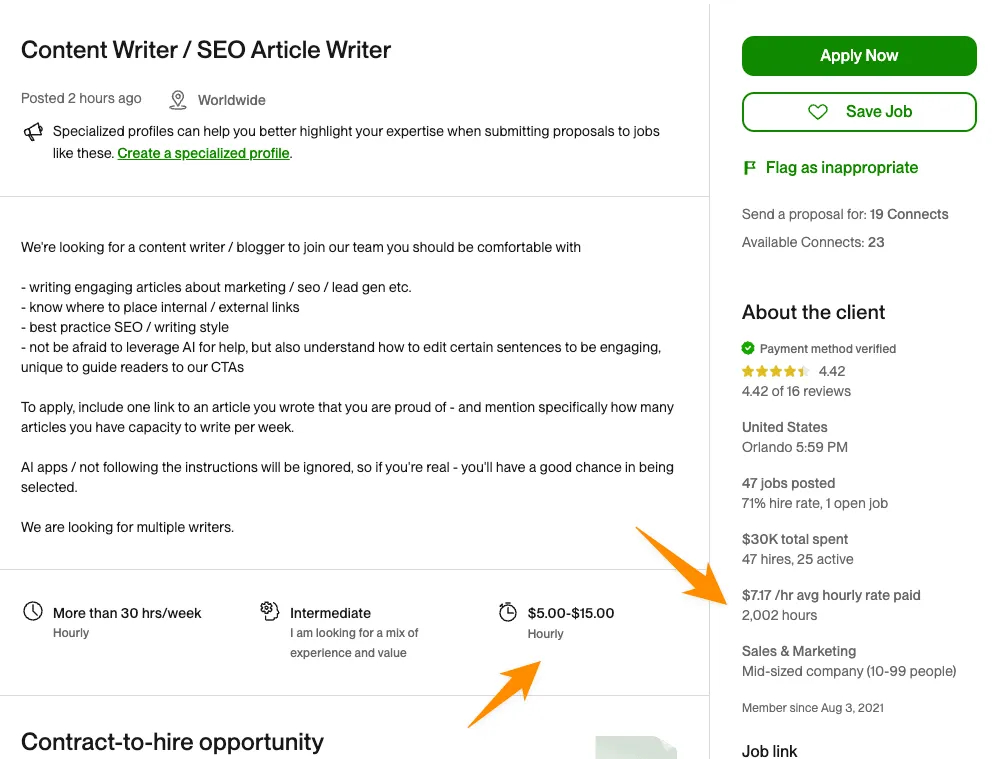
Set a Competitive Hourly Rate
Setting your hourly rate is a tricky balancing act. You need to be competitive enough to entice clients while also ensuring you're fairly compensated for your skills and experience. You can decide on the right number by:
- Researching industry standards
- Factoring in your experience level
- Adjusting your rate as you gain more experience and reviews
Upwork's own data is pretty helpful when you’re researching the perfect hourly rate for a specific job:
Stay Active to Maintain Visibility
Upwork's algorithm favors active profiles. By staying engaged, you'll increase your visibility and chances of being found by potential clients.
Regularly update your profile, create upwork proposals, and engage with clients. This shows that you're active and committed to your Upwork presence, so they don’t have to worry about any project delays.
If staying active on Upwork doesn’t fit into your schedule, an Upwork automation tool like GigRadar is the best solution.
It automates the proposal writing process, allowing you to free up time for other tasks. It also offers lead reply notifications, ensuring that whenever a lead replies to your proposal, you know about it instantly!

Improve Your Job Success Score
Your JSS reflects how well you perform your Upwork – it signals to clients that you're a top-performing freelancer. As with any success score, the higher, the better.
Experts suggest aiming for a job success score over 90 if you want more visibility, job invitations, and earnings.
Here are a few tips to help you improve your JSS:
- Overdeliver on every project: Clients love it when you go the extra mile to deliver your project ahead of schedule. communicate proactively, and be responsive to feedback.
- Invest in repeat business: That means providing exceptional service and consistently delivering results so the clients have no option but to come back for more.
- Resolve disputes like a pro: Conflicts happen, but how you handle them can impact your JSS. If a dispute arises, try to resolve it professionally through communication and compromise.
- Focus on high-value projects: While every project counts, those with higher earnings have a greater impact on your JSS.
Tailor Your Profile to Specific Niches
While it's tempting to be a jack-of-all-trades, specializing in a specific niche can get you a lot more projects. It allows you to become an expert in your chosen industry, command higher rates, and attract clients who truly value your talent.
You can use GigRadar’s customizable lead criteria and filters to ensure you’re only targeting the most relevant leads with your proposals.
Now, instead of attracting a few generic clients, you’ll be the go-to expert for a large number of high-paying clients.
Expert Tips for Upwork Profile Enhancement
Use these profile optimization and Upwork proposal tips to attract high-value clients:
- Earning the ID Verification Badge is a simple but powerful way to boost your credibility. It shows potential clients that you're a real person with verified credentials. This will also boost your chances of being considered for projects, especially those with high budgets.
- Verifying your ID is simple – just follow Upwork's instructions in your account settings. You’ll need to upload a government-issued ID and a selfie.
- Don't be shy about your accomplishments! Include quantifiable achievements (e.g., "Increased website traffic by 40% in 6 months") and any awards or recognition in your overview.
- Don't just collect feedback – actively seek it out and use it to your advantage. Ask clients for specific feedback on your communication, work quality, and overall performance. Then, use this feedback to identify areas for improvement and continuously refine your profile.
- Your Upwork profile is a living document that should evolve as you grow and develop as a freelancer. Regularly update your skills, add new portfolio pieces, and refine your descriptions. This creates a dynamic profile, which shows that you're engaged and committed to professional growth.
- Freelancers often ignore this, but asking for testimonials from clients can make your profile stand out. Even your clients outside Upwork can leave a testimonial - all you have to do is request it through their LinkedIn.
Oliver (AKA The Upwork Guy) shares another pro-tip that helped him take multiple clients to $300K/year on Upwork:
I’ve been researching over the past 4 years. People need to understand that the job feed only scratches the service and most high-earning freelancers on Upwork rarely use it!
A Bonus Tip That Only Top Freelancers Practice
Most agencies and freelancers think that asking for feedback should happen after the work’s done.
But you definitely can ask the client to leave feedback in the middle of the contract. This is called a mid-contract feedback. It’s ideal for long-term contracts and it’s often always positive.
Although it doesn’t impact JSS - but adds more credibility to your overall profile.
Learning From The Best
Always analyze the profiles of top-rated/top-rated plus freelancers in your niche. What makes them stand out? What keywords are they using? How do they present their portfolio? Learning from the best will inspire you to take your own profile to the next level.
For instance, this web developer profile by Petro prioritizes visuals, placing the portfolio front and center. He uses colorful, stylized images that transition into a concise overview focused on UI/UX web design.
Plus, the overview is easily digestible, including bullet points, short paragraphs, and an ordered list. He’s also included a recent update date to assure potential clients of his active presence on the platform.
Here’s another example. Gabrielle's profile shows how clients use diverse phrasing for similar social media skills.
Her project titles range from "Social media marketing" to "Facebook ads script," which may seem different but allude to the same set of skills. This smart keyword usage allowed her to secure varied projects despite overlapping expectations.
Summary
Now that you’ve read our upwork success tips, you have all the actionable strategies you need to stand out from the crowd.
But don't worry, you don't have to do it alone. GigRadar can handle your Upwork automation from start to finish. From finding the most lucrative gigs to streamlining your proposals, it allows you to take control of your freelance success.
Book a demo with GigRadar today and see how it can transform your Upwork performance!
Grow Your Upwork Sales with Automation
Discover how GigRadar helps you send better proposals, get more replies, and win clients faster, no manual work needed.
Book a Demo








