

Watch the 2-minute walkthrough or keep reading below.
TL;DR
→ Under 5 seats → Pipedrive Growth ($34/user/mo) handles everything. Best dual-pipeline UX on the market.
→ 5-15 seats with outbound calling → Close Growth ($99/user/mo) eliminates the separate dialer you are already paying for.
→ Any size with marketing + sales alignment → HubSpot Pro ($100/user/mo base, $890/5 seats). Best reporting, heaviest onboarding.
→ The real question: does your team actually USE the CRM, or does it collect dead contacts nobody updated since February?
→ Scroll down to the free CRM Picker tool to get a recommendation based on your exact team setup.
Every "best CRM for agencies" list reads the same. Here is what they leave out.
Your Upwork proposals live in one tab. Direct client outreach lives in another. Your CRM has 200 stale contacts nobody updated since February.
74% of agencies under 10 people abandon their CRM within 6 months. Not because the tool was wrong.
Because the person who should be logging activities IS the billable person doing the work.
I have watched this play out across dozens of agency teams we work with at GigRadar. The agency owner picks a CRM based on a feature comparison table, pays for annual billing.
By month three the team reverts to Slack threads and spreadsheets. The CRM becomes expensive contact storage.
Three CRMs actually work for agencies in 2026: HubSpot, Pipedrive, and Close. Each wins in a specific scenario.
I will tell you which one, and the interactive tool below will do the math for you.
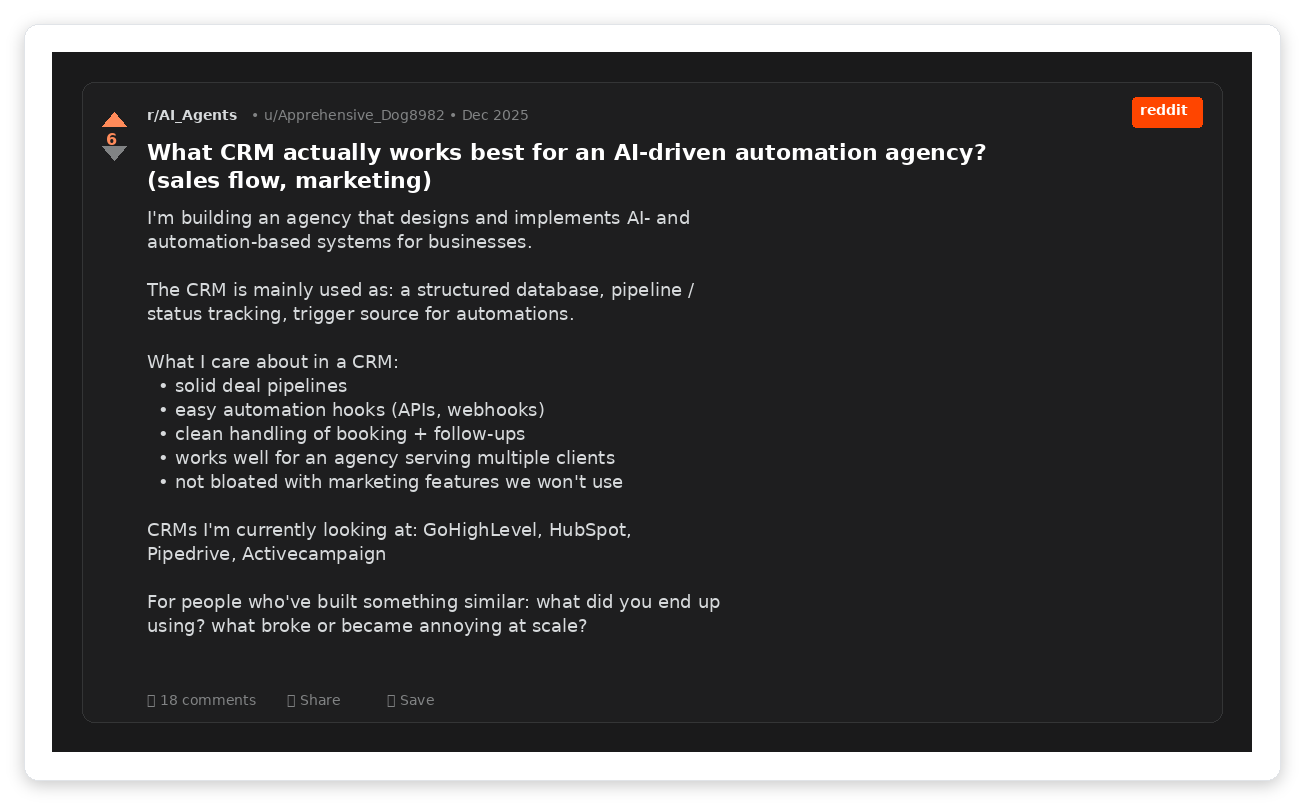
Real agency owners asking the same question you are. The answer depends on exactly three variables.
The dual-pipeline problem nobody talks about
Agencies run two structurally different pipelines. Upwork proposals are high-volume, short-cycle deals where you might send 50 proposals to land 3 contracts. Direct client outreach is the opposite: low volume, long cycle, relationship-heavy.
Most CRMs were built for single-funnel B2B sales. One pipeline, one sales motion, one set of stages from "Lead" to "Closed Won."
That model breaks when your Upwork pipeline needs stages like "Proposal Sent / Viewed / Replied / Interview / Hired" and your direct pipeline needs "Cold Outreach / Discovery Call / Proposal / Negotiation / Signed."
Pipedrive handles multiple pipelines best. Unlimited pipelines on every plan, including the $14/user Lite tier.
Close was designed for a single outbound calling motion. It can do multiple pipelines, but the UX is built around one funnel.
HubSpot supports up to 15 pipelines on Professional, but configuring them requires more setup than the other two.
If you are running Upwork bidding alongside direct outreach, the dual-pipeline question is the first filter. Get this wrong and your team defaults back to a spreadsheet within weeks.
Which CRM fits your agency? (free picker tool)
CRM Picker for Agencies
Answer 5 questions. Get a recommendation with cost estimate in 30 seconds.
HubSpot: the free tier is a delayed timer
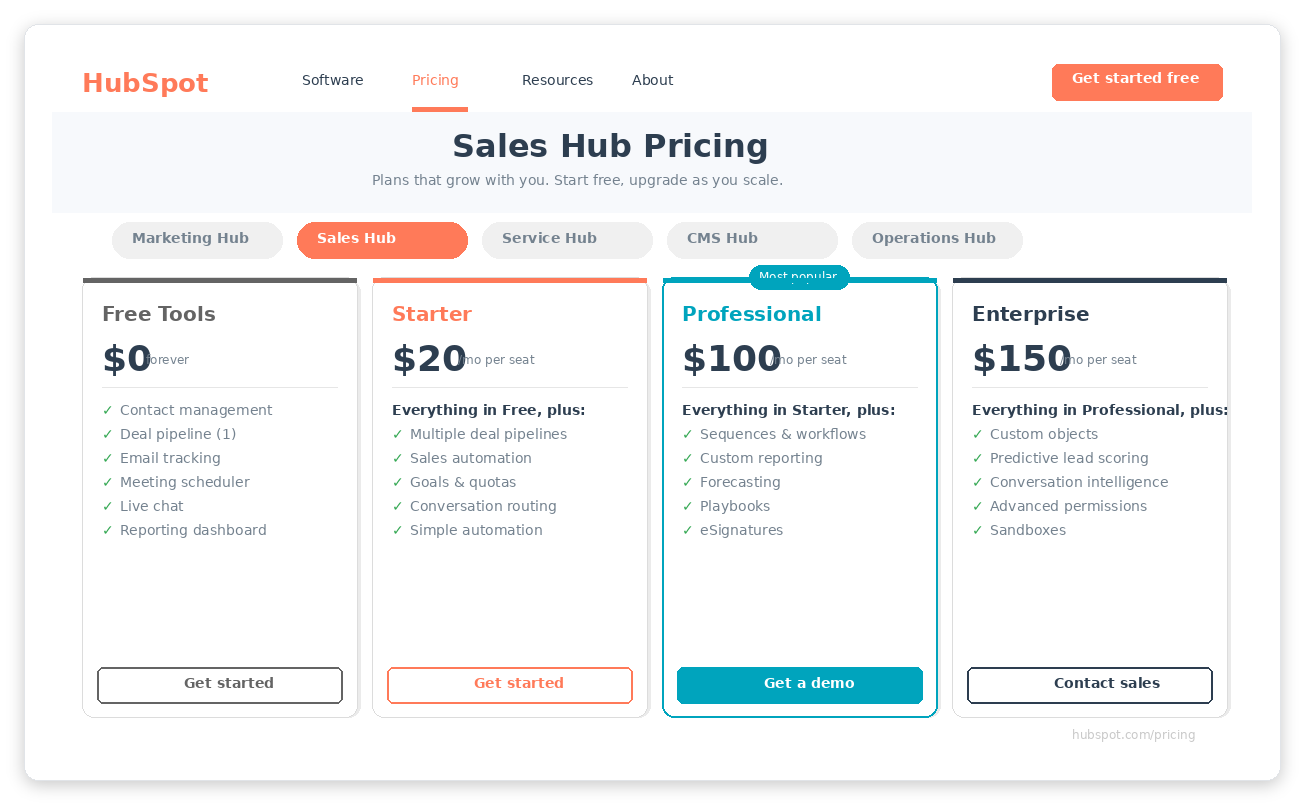
HubSpot Sales Hub pricing as of May 2026. The free tier gets you in the door. The upgrade math hits around month 4.
HubSpot is the most powerful CRM on this list and the most expensive to actually use. The free tier exists to create data gravity.
Once your contacts, deal history, and email threads live inside HubSpot, the switching cost climbs every month.
- 2 users
- 1,000 contacts (was unlimited)
- 1 pipeline
- Email tracking (limited)
- Meeting scheduler
- AI assistant + data agent
- Intent signals
- 2 pipelines
- Goals + deal split
- Simple automation
- Prospecting agent
- Forecasting + deal insights
- Up to 15 pipelines
- Sales workspace
- $1,500 onboarding fee
- Deal journey analytics
- Pipeline approvals
- Predictive lead scoring
- Custom objects
- $3,500 onboarding fee
What makes it worth it: 1,700+ integrations (largest ecosystem), Breeze AI agents across the entire platform, and reporting that actually tells you where deals stall. HubSpot launched a native Claude connector in Q4 2025, and Clay integration is bidirectional. G2 ease of use: 8.3/10.
Hidden cost warning: Data gravity problem. After 12 months of active use, migrating out of HubSpot costs 20-40 hours of manual work. The free tier is freemium in the truest sense. You pay with lock-in, not money. Source: Zapier comparison.
For agencies, HubSpot Professional makes sense only if you need marketing AND sales in one place. If you are purely a sales team sending Upwork proposals and tracking deals, it is overpowered and overpriced.
Pipedrive: the one your reps will actually use
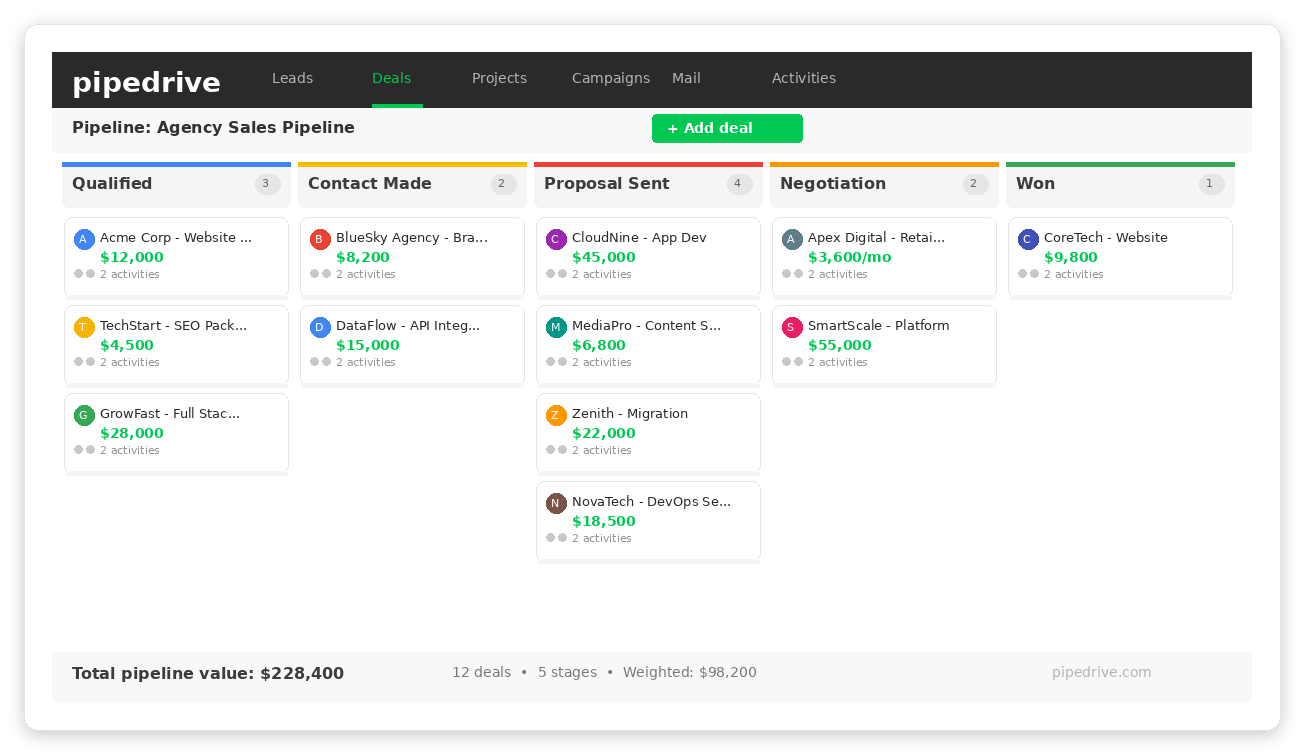
Pipedrive's visual pipeline. This is what your reps see when they open the CRM. Drag-and-drop deals between stages. That simplicity is the entire value proposition.
Pipedrive exists because two founders got tired of bloated CRMs that salespeople refused to use. That origin story still drives the product. G2 ease of use: 8.9/10, the highest of any CRM in this comparison.
- Unlimited pipelines
- Lead management
- Calendar sync
- Deal rotting alerts
- Email sync + tracking
- Automations (up to 30)
- Email sequences
- Revenue forecasting
- Lead routing
- Lead scoring
- Contracts + e-signatures
- 60 automations
- Data enrichment
- Advanced security
- Unlimited automations
- Phone support
The agency advantage: unlimited pipelines on ALL plans (HubSpot caps at 15 on Pro). Deal rotting alerts are built-in, so you know when a deal sits too long in a stage.
500+ integrations and strong Zapier support. European company (Estonia), GDPR-first architecture.
Where it falls short: Reporting is limited until Premium ($64). No native marketing automation. Calling is an add-on at $2.50/user/mo. If you need campaigns, that is a separate $13.33/mo add-on. LeadBooster for lead gen is $32.50/mo extra. These add-ons add up. Source: Pipedrive pricing.
For most Upwork agencies under 10 people, Pipedrive Growth at $34/seat is the answer. Your team will open it. They will log deals. That alone makes it worth more than a $100/seat tool nobody uses.
Close: the calling machine (and its hidden price tag)
Close was built for outbound sales teams that live on the phone. If your agency does cold calling to land direct clients, Close is the best tool for the job.
If your agency does not make 10+ calls per day per rep, you are paying for a feature you will never use.
- Unlimited contacts/leads
- Multiple pipelines
- Built-in email + calling + SMS
- Task management
- Power Dialer
- AI Email Assistant
- Workflows + automations
- Custom fields + activities
- Predictive Dialer
- Call coaching
- Unlimited call recording
- Custom permissions
The Power Dialer is best-in-class for SMB sales teams. G2 rating: 4.7/5 from 2,010 reviews. For teams that dial 20+ calls a day, it replaces a standalone dialer and saves $50-150/month per rep.
Hidden cost breakdown for a 5-rep team on Growth: Base: $495/mo. Call Assistant: $50/mo org + ~$0.02/min (~$77/mo at avg usage). Premium phone numbers: $19/line x 5 = $95/mo. Real monthly cost: $717-$872/mo. Not the $495 the pricing page suggests. Source: Prospeo analysis.
Close is worth the premium for one type of agency: teams where outbound calling is the primary lead generation channel. For Upwork-focused agencies, the calling-first UX does not match Upwork's text-based communication pattern. You are paying for a phone system to manage a platform that runs on proposals and messages.
What does each CRM actually cost for a 5-person agency?
Real monthly cost for a 5-person agency. Includes add-ons and onboarding costs amortized over 12 months.
Head-to-head: HubSpot vs Pipedrive vs Close
| Feature | HubSpot Pro | Pipedrive Growth | Close Growth |
|---|---|---|---|
| Price/seat | $100/mo ($178 effective at 5-seat flat) | $34/mo | $99/mo |
| Free tier | ✓ 2 users, 1K contacts | ✗ 14-day trial only | ✗ 14-day trial only |
| Pipelines | Up to 15 | ✓ Unlimited | Multiple (no cap stated) |
| Email tracking | ✓ Full (opens, clicks, replies) | ✓ Full | ✓ Full |
| Built-in calling | VoIP add-on | Add-on ($2.50/user) | ✓ Power Dialer included |
| Sequences | ✓ Up to 500 enrollments/day | ✓ Email sequences | ✓ Email + call sequences |
| AI features | ✓ Breeze AI (prospecting, content, data agents) | AI assistant (basic) | AI Email Assistant |
| Reporting | ✓ Advanced (best in class) | Basic (limited until $64 tier) | Basic (activity reports) |
| Integrations | 1,700+ | 500+ | 100+ |
| Mobile app | ✓ Full-featured | ✓ Full-featured | ✓ Good |
| Onboarding time | 1-2 weeks (needs admin champion) | ✓ 1 day | Same-day (for calling teams) |
| Best for | Marketing + sales alignment | Sales-focused agencies | Calling-heavy outbound |
Sources: HubSpot, Pipedrive, Close, SaSaNova, Productive
The hidden cost nobody calculates: adoption failure
CRM costs are not just license fees. They are adoption costs.
Every hour your team spends learning a new tool is an hour they are not billing clients. Every deal that does not get logged is invisible revenue you cannot forecast.
Pipedrive: 1 day to full adoption. Drag a deal card, done.
HubSpot: 1-2 weeks minimum. Needs an admin champion who configures pipelines, custom properties, and automations before the sales team touches it.
Close: Same-day for calling teams. CSV import, assign phone numbers, start dialing.
I have seen agencies spend $5,000+ per year on HubSpot Pro and use 20% of the features. The dashboards look impressive in demos.
But the rep who just finished a 3-hour client call does not want to navigate a 6-tab contact record to log a note. They want to drag a card.
Free for Upwork agencies
Your Upwork Pipeline Deserves Better Than a Spreadsheet
GigRadar automates proposal submission through a real Upwork Business Manager. Feed your CRM with qualified Upwork leads automatically.
Get Your Free Agency Audit →Which CRM plays with GigRadar (and why it matters)
Here is the scenario most agency owners deal with: Upwork proposals go out through one system, direct outbound lives in another, and nobody has a single view of the full pipeline. You end up with two sets of numbers that never reconcile.
GigRadar operates a real Upwork Business Manager account. Your agency invites GigRadar's BM into your agency through Upwork's native invitation system. Proposals submit from the BM's own Upwork account under GigRadar's supervision. Your agency account is never touched.
The pipeline data GigRadar generates (proposals sent, replies received, interviews, hires) can feed into any CRM via Zapier or webhooks. Here is how each CRM handles it:
| CRM | GigRadar Fit | Integration Path | Setup Time |
|---|---|---|---|
| Pipedrive | ✓ Best | Zapier: auto-create deals per proposal | 30 min |
| HubSpot | ✓ Good | Zapier: unified contact timeline | 1-2 hrs |
| Close | Functional | Zapier: works but calling-first UX mismatch | 1 hr |
Pipedrive is the cleanest fit. Create a dedicated "GigRadar Upwork" pipeline with stages matching the Upwork flow: Proposal Sent, Viewed, Replied, Interview, Hired.
Auto-create deals from proposal notifications via Zapier. Your Upwork pipeline and direct pipeline live side by side with zero overlap.
HubSpot works well through its native Zapier integration. The advantage: a single contact record shows both Upwork history and direct touchpoints.
The downside: setup takes longer and requires custom properties for Upwork-specific fields.
Close works but does not fit naturally. Upwork is text-based, and Close's UX is built around calling and email sequences.
The real value is a single dashboard showing both pipelines. When a client you found on Upwork also appears in your direct outreach list, you want to see that overlap instantly. That is a CRM problem, not a platform fee problem.
Want to see how GigRadar's pipeline data feeds into your CRM? Book a demo and we will map it to your exact setup.
The 30-day CRM migration checklist (copy and use it)
30-Day CRM Migration Plan
Works for any CRM switch. Adjust stages to your pipeline.
Week 1: Export + Map
- Export all contacts from current CRM to CSV
- Map custom fields (Upwork-specific: proposal count, reply rate, job category)
- Set up new CRM account (pick plan based on CRM Picker results above)
- Create user accounts for all team members
- Document current automation rules before they disappear
Week 2: Import + Configure
- Import contacts (clean duplicates BEFORE importing, not after)
- Configure two pipelines: Upwork proposals + direct outbound
- Set up email sync for all team members
- Create deal stage definitions (write them down, share with team)
- Test one deal through the full pipeline manually
Week 3: Automate + Connect
- Build automation rules (deal stage change triggers task, new lead triggers notification)
- Connect Zapier integrations (GigRadar, email, calendar, Slack)
- Set up deal rotting alerts (7 days for Upwork, 14 days for direct)
- Create saved filters and views for each team member
- Train team on mobile app (they will use it more than desktop)
Week 4: Validate + Kill
- Run both old and new CRM in parallel for 5 business days
- Compare deal counts: new CRM should match old CRM within 5%
- Verify all automation rules fired correctly
- Get team sign-off (each person confirms they can do their daily workflow)
- Kill the old CRM. Cancel the subscription. Do not keep it "just in case."
Stop comparing features. Start comparing adoption rates.
Every CRM comparison article ends with "it depends on your needs." That is useless. Here is what actually depends on what:
Your team makes 10+ calls a day? Close Growth. No contest. The built-in Power Dialer pays for itself in dialer savings alone.
You need marketing automation alongside sales? HubSpot Professional. Nothing else comes close for marketing + sales alignment. Accept the onboarding cost and the lock-in risk.
Everyone else? Pipedrive Growth at $34/seat. It is the CRM your team will actually open, actually log deals in, and actually use past month three. For Upwork agencies running proposals alongside direct outreach, the unlimited dual-pipeline setup is exactly right.
The CRM that gets used beats the CRM that has more features. Every time.
And if your Upwork pipeline is still a spreadsheet, GigRadar's Business Manager model automates proposal submission so your CRM actually has data worth tracking. That is the starting point. See pricing.








