

🎬 Upwork Automation: What Gets You Banned in 2026 — What Upwork's detection system actually flags, the architecture difference between safe and risky tools, and how to build a compliant automation stack. Watch on YouTube
TL;DR
- Upwork automation is not banned. Automating the wrong things is. Tools can prepare, but humans must decide and send.
- In 2025, Upwork increased automation-related account bans by 23%. Browser extensions like auto-refresh and page monitors trigger enforcement.
- Detection is behavioral (submission speed, session fingerprints, background requests), not tool-name-based.
- Safe upwork automation: no credential sharing, no browser access, human clicks Send on every proposal.
- Use the free compliance audit tool below to score your current setup.
A developer posted an Upwork email on Hacker News in November 2025. Subject line: "Account Restricted: Upwork Policy Violation." His offense: a Chrome extension called "Upwork Search Enhancements" that made the job feed easier to use. No scraping. No auto-proposals. Just a better search bar.
His account was restricted instantly. The enforcement was, in Upwork's own words, "completed fully by automation." No human reviewed his case before the restriction hit.
That is the environment agencies are operating in right now. The confusion about what upwork automation is actually safe (versus what gets you permanently banned) is costing agencies real revenue.
The losses are not coming from the tools themselves. They are coming from the account suspensions that follow.
23% more accounts banned in 2025, and most of them were not running bots
Upwork reported a 23% increase in automation-related account bans in 2025. Suspended freelancers lost an average of $47,000 in annual income per account.
The reason enforcement tightened is not because automation got worse. It is because it got better.
AI proposal tools went mainstream, browser extensions multiplied, and Upwork's marketplace started drowning in robotic proposals that clients could identify from the subject line.
Upwork's response was predictable: tighten the detection, flag more accounts, ask questions later. The collateral damage was equally predictable. Legitimate agencies running innocent browser extensions got swept up alongside actual bot operators.
If you run an Upwork agency doing $10K+ per month, your account is worth six figures in future revenue. Understanding what responsible automation on Upwork looks like is not optional. It is operational risk management.
what Upwork's detection actually looks for (it is not tool names)
Upwork does not maintain a list of "banned tools." There is no database of extension IDs or software names being checked against your account. What Upwork detects is behavioral patterns.
Their enforcement systems monitor five signal categories: submission velocity, session fingerprinting, rate-limit triggers, background HTTP requests, and credential anomalies. A completely harmless tool can trip the same signals as a malicious one.
An auto-refresh extension polling the job feed every 30 seconds generates traffic patterns identical to a data scraper. Upwork's systems do not distinguish intent. They distinguish behavior. The Trust and Safety documentation is unusually direct: "Because our systems detect these behaviors automatically, using the tool again will result in another suspension."
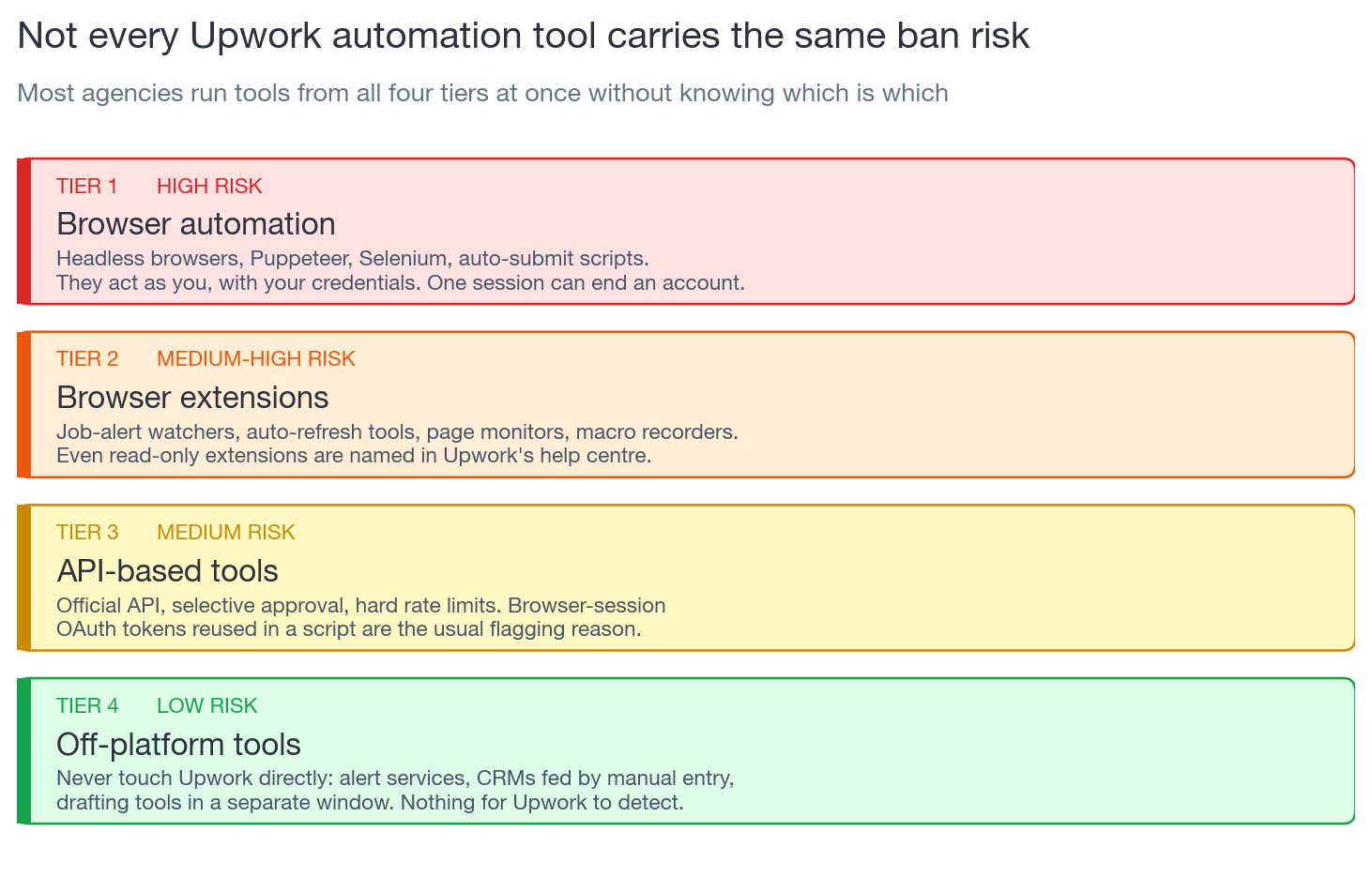
the four risk tiers of upwork automation tools
Not all automation carries the same risk. The market splits into four tiers, and most agencies do not know which tier their tools fall into.
Headless browsers, Puppeteer, Selenium, auto-submit scripts. These control your browser, log in with your credentials, and perform actions as you. They generate the exact behavioral fingerprint Upwork's ToS was designed to catch. One session can end an account.
Even "passive" extensions that only read Upwork pages can trigger enforcement. Upwork's help center explicitly names these: job alert watchers, auto-refresh tools, page monitors, macro recorders, user-script managers, auto-paging helpers. The HN developer's "Search Enhancements" extension fell here.
Upwork offers an official API, but approval is selective and rate-limited. An API key is not a free pass. Common flagging reasons: using OAuth2 tokens from a browser session in a script, calling website pages instead of API endpoints, exceeding rate limits, or mixing credentials across contexts.
Tools that never touch Upwork directly. Job alert services monitoring public RSS feeds. CRM systems tracking proposals from manual data entry. AI tools drafting proposals in a separate window for you to copy-paste. Analytics dashboards built from your own exports. Nothing for Upwork to detect because no Upwork account access occurs.
Most agencies have tools scattered across all four tiers without realizing it. A Tier 4 CRM is fine. A Tier 2 "productivity extension" running alongside it can take down the whole account. Your Connects strategy and your automation stack are both part of the same operational risk surface.
Interactive Tool
Upwork Automation Compliance Audit
Answer 8 questions about your current tools. Get an instant risk score and specific recommendations.
the real line Upwork draws (it is simpler than the fear suggests)
Upwork's own help center states it in one sentence: "automation can prepare and support, but humans must decide and send." That is the entire upwork automation policy distilled.
Everything on the safe side of that line shares one property: no Upwork account access. Everything on the risky side shares another: the tool acts as you inside Upwork's platform.
The confusion comes from the middle ground. And the middle ground is where most agencies live. If you are not sure whether your tools access Upwork, the audit tool above will tell you in 60 seconds.
why "is this tool ToS-compliant?" is the wrong question
Most agencies evaluate automation tools by asking vendors "is this allowed on Upwork?" That is the wrong question because Upwork does not approve or reject tools. It detects behavior.
A tool can be technically "compliant" in its marketing while still generating patterns that trigger enforcement. The HN developer's UX extension was arguably making Upwork better for its own users. His account was still restricted.
"Why don't they like that their user experience is improving?"
Hacker News commenter, November 2025
The right question is: "Does this tool access my Upwork account, and what signals does that access generate?" If the answer involves logging in with your credentials, running in a browser context alongside Upwork, making HTTP requests to Upwork domains, or modifying the DOM of Upwork pages, you are in the detection zone.
Not because the tool is malicious. Because Upwork’s Terms of Use draw the line at the access method, not the intent. Section 3.5 forbids using “a robot, spider, scraper, or similar mechanisms on our site without written permission” and accessing “our services through any technology other than our interface” (Upwork Terms of Use, v4.12, section 3.5). A tool that signs in as you and drives the page produces exactly those signals, the same ones actual bad actors produce.
how compliant upwork automation architecture actually works
The architecture that survives enforcement at scale has three properties: no browser automation, no credential sharing, and a human approval step on every outbound action. Here is what that looks like when an agency implements it.
Public job feed data is scanned without logging into any Upwork account. No session cookies. No browser context. The tool reads what anyone on the internet can read.
The tool surfaces jobs matching your criteria (skills, budget floor, payment-verified clients). The decision to bid happens in your head, not in a script. Your team only sees jobs that already passed quality gates.
AI generates structure and first-draft copy from the job post. A human reads the brief, adjusts for the specific client signal, and clicks Submit in their own browser. The AI handles structure. The human handles nuance. This is both compliant and more effective than fully manual writing.
Instead of sharing your login credentials with a tool (which Upwork flags as account masquerading), a dedicated manager is added to your Upwork agency through official channels. No credential sharing ever occurs. This is the architectural choice that separates compliant tools from ones that get accounts flagged.
Reply rates, shortlist rates, cost-per-hire: all computed from data you export or enter yourself. Not scraped in real time from Upwork pages. This gives you the feedback loop to improve how Upwork's algorithm ranks your proposals without generating any detectable signals.
Free for Upwork agencies
Stop gambling your account on risky browser extensions
GigRadar automates job filtering and proposal drafting without touching your browser, sharing your credentials, or triggering Upwork's detection. Human review on every proposal. Battle-tested on 3,000+ agencies.
Get Your Free Agency Audit →the one-week automation audit for your agency
If you are not sure whether your current tools put you at risk, here is a concrete seven-day process. Every agency running upwork automation should do this at least once per quarter.
Day 1: Inventory everything
List every tool, extension, and script your team uses that touches Upwork in any way. Include browser extensions on every team member's machine. Most agencies discover 2-3 tools they forgot about.
Day 2: Classify by risk tier
Tag each tool as Tier 1 through 4 using the framework above. Anything that logs into Upwork, modifies Upwork pages, or sends requests to Upwork domains is Tier 1 or 2.
Day 3: Remove Tier 1 and 2 tools immediately
Do not wait. If Upwork has not flagged you yet, you are borrowing time. Disable the extensions. Uninstall the scripts. Every day they run is a day closer to enforcement.
Day 4: Read the actual policy documents
Read Upwork's official automation policy and Terms of Service with your entire team. Not a blog summary. The actual documents.
Day 5: Document your safe workflow
Write up which tools are approved, how proposal submission always includes human review, and what is explicitly not allowed. Put it in your agency SOPs so new team members follow it from day one.
Day 6: Automate one thing off-platform
Identify one repetitive internal task (reporting, CRM updates, lead scoring) you can safely automate without touching Upwork. This is where automation delivers real ROI without any compliance risk.
Day 7: Set the quarterly reminder
Upwork updates its enforcement regularly. The January 2026 AI data-training policy caught many agencies unprepared. Set a calendar reminder to repeat this audit every quarter.
what happens after enforcement (and whether you can recover)
Upwork uses a tiered enforcement model. The first offense is typically a warning or restriction. The second is a longer restriction. The third is a permanent block with no appeal.
If you receive a restriction, you can usually recover by disabling the offending tool, acknowledging the ToS in your account health hub, and waiting. One YouTube creator documented four cases in a two-week period where accounts were suspended for auto-refresh extensions. All four were restored after removing the extension and completing the self-resumption flow.
Permanent blocks are different. They happen for severe violations (auto-submitting proposals at scale, systematic data scraping) or repeated offenses after prior warnings. A permanent block means your JSS, reviews, work history, and client relationships are gone. New accounts you create will be identified and closed.
The math is brutal. If your agency earns $20,000 per month from Upwork and you have built that over two years, your account represents roughly $480,000 in future revenue at current run rate. No browser extension that saves 10 minutes a day justifies a non-zero chance of losing that.
The agencies that treat Upwork as a legitimate long-term business channel share one mindset: they treat their account the way a restaurant treats its liquor license. One violation stops the entire operation.
The tools that survive at scale are the ones built on the compliant side of the line from day one. Not because compliance is a feature. Because losing a $47K/year income stream to save 10 minutes on job filtering is the kind of math that only makes sense if you have never done it.
If you are not sure where your agency stands, run the audit tool above. It takes 60 seconds. The alternative is finding out from Upwork's Trust and Safety team, which takes considerably longer and ends worse.








