

3-minute video walkthrough. The invite flow, the role planner, and the 14-day onboarding that keeps new members bidding.
Adding a freelancer to your Upwork agency takes about 90 seconds. Keeping them profitable for the next 90 days is the hard part.
I have watched more than 200 agency owners send the invite, get an acceptance, and then stall for six weeks because the new member had no bids to run, no clarity on which profile to apply from, and no owner time for onboarding.
This guide walks through the actual click path (every menu label verified April 2026), the four roles you have to pick between, the Connects math when more than one person is bidding, and a 14-day playbook that gets the new hire closing work by day 12.
I am writing this from the seat of someone who has built two agencies on Upwork and consulted on about 50 more through GigRadar. Everything below is what I would tell a friend who texted me "how do I add my first hire" at 11pm.
Before you send the invite: three things that must be true
You cannot invite anyone until all three of these are in place. Skipping any one of them wastes a Connect budget and burns goodwill with the hire before their first bid goes out.
- You are on Agency Plus, not Agency Basic. The free Basic plan does not let you invite members or buy Connects. The upgrade runs $20/month and is the only way to build a multi-bidder agency. Full plan comparison here.
- The person you are inviting already has an Upwork freelancer account. Or they can create one during the invite flow, but that adds 2 to 5 days of account approval before they can bid. Verify first.
- You have actually decided on their role and membership type. Exclusive vs non-exclusive and Owner vs Business Manager vs Member. The role picker is buried two screens into the invite and you cannot change it cleanly later without friction.
If you are fuzzy on the third one, skip to the role planner calculator below and come back here. Everything downstream depends on getting this right the first time.
The invite flow: 8 steps with the exact menu labels
Upwork renamed this flow twice in 2025. The navigation below is what lives in the product as of April 2026. Old tutorials that say "Teams & Members" are pointing at a menu that was retired.
- Switch to your agency profile. Click your avatar in the top-right, open the account dropdown, and pick your agency name. You cannot invite members from the solo freelancer view.
- Click "Settings" (left sidebar on desktop, or cog icon on mobile).
- Open the "Members & Permissions" tab. On older accounts this still says "Teams & Members" and it works either way.
- Click the "Invite New User" button in the top-right. You will see a modal with three fields.
- Enter the email address or Upwork username. Multiple invites at once: separate with commas. Max 10 per batch.
- Pick the membership type (Exclusive or Non-exclusive). Default to non-exclusive for the first 3 to 5 hires. Details in the next section.
- Pick the role (Owner, Business Manager, Manager, or Freelancer). This controls what they can actually do inside the agency. Full permission grid below.
- Write a personal message (optional but do it), then click "Send Invite". The invite email hits their inbox within 60 seconds. They accept by clicking through and toggling "Accept agency invitation" in their own account settings.
The hire then appears in your Members list with status "Pending" until they accept. Most trusted hires accept within 24 hours.
If you are still pending after 48 hours, DM them the link directly. The invite email goes to spam roughly 30% of the time.
The four roles and what each one can actually do
This is where agencies quietly leak money. Pick Freelancer for someone who should be a Business Manager, and they cannot pull in work when you are on a plane. Pick Business Manager for someone who should be a Member, and they can see every client rate in your account including your markup.
| Capability | Owner | Business Manager | Manager | Freelancer |
|---|---|---|---|---|
| Submit proposals on behalf of the agency | Yes | Yes | Yes | Yes |
| Bid using another member's profile as the pitched expert | Yes | Yes | No | No |
| Invite new members | Yes | No | No | No |
| Withdraw funds / manage billing | Yes | Only if "Finance" toggled on | No | No |
| See other members' client billing rates (your markup) | Yes | Yes | No | No |
| Close or cancel contracts | Yes | Yes | Assigned contracts only | Assigned contracts only |
The role most owners underuse is Business Manager. That is the single seat that lets one person do bidding using any team member's profile as the pitched expert. It turns one bidder into a lever that moves four bidders' pipelines.
The role most owners overuse is Freelancer with Finance toggled on. I have seen three agencies in the last year where a contractor they thought was remote-vetted drained the agency wallet and disappeared.
Keep Finance off unless the person is an actual operating partner.
Why "I'll just apply as a team from my personal account" is a TOS landmine
Every week a founder posts some version of this question on r/Upwork. The reply thread has the same answer every time, and it is the reason the $20/month Agency Plus charge is actually the cheap option.
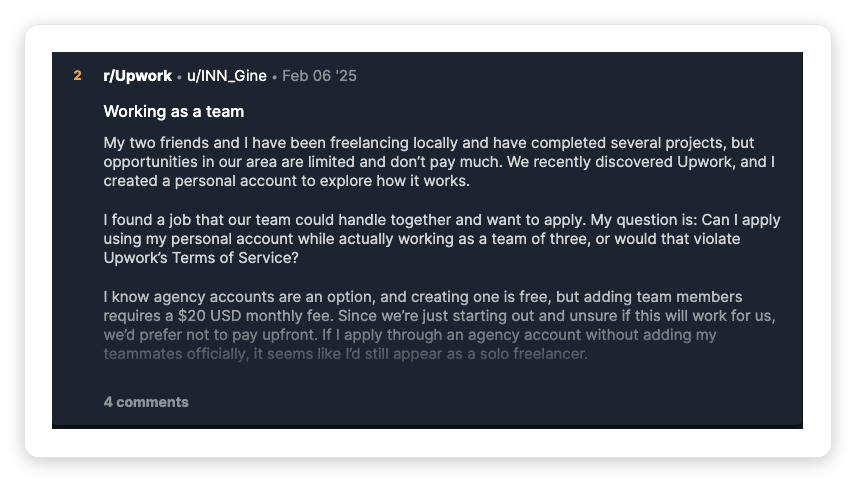
Classic question on r/Upwork. Upwork’s Terms of Use do not say “you must have an agency”; they say you must be honest about who is doing the work, and the agency is the only delegation mechanism Upwork documents.
Here is what Upwork actually writes, rather than what the thread assumes. Section 3.2 of the Terms of Use is a disclosure rule, not an account-type rule.
“Similarly, you must always be honest about who’s doing the work. That means you can’t: allow someone else to use your account, which misleads other users or falsely claim one freelancer will do a job when another will actually do it – including submitting a proposal on behalf of a freelancer who can’t or won’t do the work.”
“Never share your Account password with anyone; you can give permissions to other Users to act under your Account Types as Team Members or Agency Members if needed.”
Read together, those two clauses are the whole answer. Upwork bans the workaround (sharing a login, or letting someone else do work you claimed you would do) and names exactly one sanctioned alternative: Agency Member permissions.
The consequence is documented too. Section 1.3 of the User Agreement reserves Upwork’s right to “suspend or terminate the Account, or access to our Services, of anyone who provides false, inaccurate, or incomplete information in creating, marketing, or maintaining a Profile or an Account.”
A suspension costs more than $20/month. That is the entire economic argument.
Convert properly, add the freelancer as an agency member, and the whole thing is above board. That is the entire point of the flow this article describes.
Interactive: pick the right role and membership type in 30 seconds
Free Tool: Agency Role Planner
Which role and membership type should this new member get?
Answer 5 questions about the person you are about to invite. The planner returns the exact role, membership type, and a flag if you should not add this person yet.
Exclusive vs non-exclusive in 60 seconds
The deeper breakdown lives in the full agency account guide, but for the decision you are about to make on the invite screen, it comes down to one question: can you guarantee 20+ hours per week of paid work for this person right now?
Default for your first 3 to 5 hires. They keep their solo Upwork profile and can join other agencies or take side work.
Lower churn, lower commitment, and reversible. Easy to upgrade later.
Only for core team with 3+ months of steady hours. Their JSS and hours get consolidated under your agency.
Per Upwork's agency JSS docs, once the agency qualifies for a score, exclusive members display your agency JSS instead of their own personal one.
The trap I watch agencies step on weekly: they mark the first hire Exclusive because it feels more serious. Then a slow month hits, the new member sits idle for three weeks, and they churn with a sour taste.
The agency JSS takes the bruise because the idle contract closed with no work logged.
Start non-exclusive. Flip to exclusive when the hours are real.
How Connects work when you have multiple members bidding
This is the mechanic that breaks most new agency Connects budgets. Connects on Agency Plus are pooled at the agency level, not per-member.
One shared wallet funds every proposal sent by every member. If three of you are bidding and each sends 10 proposals a day at 14 Connects average, the wallet drains at roughly 420 Connects a day. That is $63 a day, or roughly $1,900 a month, at Upwork's $0.15/Connect rate.
| Bidders active | Proposals/week | Connects/week | Weekly cost |
|---|---|---|---|
| 1 (just you) | 50 | 700 | $105 |
| 2 | 100 | 1,400 | $210 |
| 3 | 150 | 2,100 | $315 |
| 4 | 200 | 2,800 | $420 |
Assumes 14 Connects per proposal, which is the 2026 average across our customer base. Boosted proposals go higher. The math punishes agencies that let every member bid without coordination.
The fix is not "bid less." It is target discipline: every member should be bidding in a distinct niche lane so you are not paying twice to appear on the same job. More on that in the multi-member workflow section below.
The 14-day playbook after you hit Send Invite
The invite is the easy part. The 14 days that follow decide whether this hire becomes productive or becomes a cold seat draining your Connect budget.
Here is the exact cadence I run with new agency hires, refined over 50+ onboardings.
Day 0 to 1: the acceptance window
- Send the invite with a short personal message ("Hey J, this is the Upwork agency invite. Accept it when you get a second and reply here once you do.")
- If they have not accepted in 24 hours, DM them the direct link: app.upwork.com/nx/settings/members-permissions
- The moment they accept, verify the role and membership type you set are what shows up in the Members list. Upwork occasionally defaults roles incorrectly on first accept.
Day 2 to 5: profile and proposal prep
- Have them optimize their own Upwork freelancer profile to match your agency's niche. Same headline structure, portfolio pieces that match what you sell.
- Share your winning proposal templates and the 5 most recent wins with the exact pitch used.
- Assign them a narrow bidding lane: one specific niche (e.g., "Shopify performance audits only") or one client size bracket ($5K to $15K projects). Do not let them bid wide on day 3.
Day 6 to 10: supervised bidding
- Target: 8 to 12 proposals sent in the first 5 days of active bidding. Quality over volume.
- Review every proposal before it goes out for the first 5 days. This catches the "applying as themselves instead of the agency" mistake early.
- Expected reply rate on a cold agency profile: 3 to 5%. If they are at zero replies after 12 bids, the issue is niche lane, not headline, 8 times out of 10.
Day 11 to 14: first-close target
- Target: 1 booked discovery call or 1 message reply that is actively moving toward hire.
- Run the discovery call together. Let them lead, you co-pilot. This is where they learn to close as "we" instead of "I".
- By day 14, you should have either a signed contract or a clear list of 3 warm leads to follow up on week 3. If neither, pause them on bidding and rerun the niche-lane decision.
Most agencies skip days 2 to 5 entirely and go straight from "invite sent" to "start bidding tomorrow." The new hire ends up spraying proposals in the agency's name with no niche and no alignment on what to say.
That is the cold-seat failure mode and it is 100% preventable.
Five pitfalls that kill new multi-member agencies
Pattern-matched from the last 18 months of GigRadar onboardings. Each one has a specific fix.
- The cold seat. Member accepts the invite, does nothing for 4 to 6 weeks because there is no onboarding structure. Fix: run the 14-day playbook above as a checklist, not a vibe.
- Duplicate bidding on the same job. Two members send proposals to the same job post. Upwork treats this as spam and deprioritizes both. Fix: assign non-overlapping niche lanes on day 2.
- Exclusive marked too early. First hire marked exclusive on day 1, can't fill hours, churns, closed contracts tank the agency JSS. Fix: default to non-exclusive until 20+ hours/week is real for 3 months.
- Finance permission handed out like candy. New Business Manager can withdraw funds. 3 of 50 agencies I have worked with had a wallet drain from this. Fix: keep Finance off unless the person is a named operating partner.
- No clarity on which profile to apply from. Non-exclusive members bid some proposals solo, some as the agency. Both accounts appear in the same job feed and Upwork flags it. Fix: one decision per niche lane ("all Shopify proposals go out under the agency"), documented in writing.
How GigRadar users actually scale multi-member bidding
This is the section I get asked about every time I talk to an agency owner who just added their second or third hire. How do you coordinate bids across multiple members without burning Connects on duplicates or losing niche focus.
The mental model that works: scanners per member, bidders per scanner, one Business Manager as conductor.
A scanner is a saved search with niche filters (keyword, budget, client country, hire history). In GigRadar, each member gets their own scanner or two. The Business Manager reviews the shortlist across all scanners every morning and dispatches bids using whichever member's profile fits the job best.
The Business Manager's lever role (ability to bid using any member's profile) is what makes this workflow scale. One conductor, four bidder profiles, zero duplicates.
- Scanner A (new Shopify stores under $3K): bids go out under junior member's profile
- Scanner B (Shopify Plus replatforms, $15K+): bids under senior member's profile
- Scanner C (Shopify speed audits): bids under specialist's profile
- Scanner D (long-term retainers, any size): bids under owner's profile
- Business Manager reviews all four scanners daily, dispatches 15 to 20 bids across the 4 profiles, no duplicates, each pitch matches the profile's strongest signal.
This is the multi-member structure agencies pay GigRadar to run because doing it by hand eats 2 to 3 hours a day of coordination time. If you are curious how it plays out for a real agency, the Shopify agency workflow guide has a full case study with numbers.
Frequently asked questions
Can I add a freelancer to my Upwork agency without upgrading to Agency Plus?
No. The Agency Basic plan does not allow member invites. Upgrade to Agency Plus ($20/month) first, then the Invite New User button appears in Members & Permissions. One exception: enterprise agency invitations from Upwork Talent Solutions sometimes waive the fee, but that is a separate program.
Does the freelancer need their own Upwork account before I invite them?
Technically no, but in practice yes. Upwork's invite flow offers to create an account for them during acceptance, but that adds 2 to 5 days of identity approval before they can bid. For anyone you want active in week one, have them create and verify their freelancer account before you send the invite.
Can I change a member's role after the invite is accepted?
Yes. Open Members & Permissions, click the three-dot menu next to their name, pick "Edit member roles". The change applies immediately to new actions. Existing active contracts stay under the original assignment.
Will adding a freelancer hurt my agency's Job Success Score?
It depends on their delivery. Per Upwork's agency JSS documentation, both exclusive and non-exclusive members' contract outcomes count toward the agency's score.
A weak hire with closed-no-work contracts drags the agency JSS down within one measurement window. A strong hire improves it. Vet hard on profile signal before inviting.
Can I invite multiple freelancers at once?
Yes, up to 10 at a time. Use a comma-separated list of emails or Upwork usernames in the invite field. The same role and membership type apply to all in the batch, so only do this for people getting the same seat.
What happens if the freelancer I invited is already in another agency?
Non-exclusive members can belong to multiple agencies. If you try to add someone who is currently exclusive to another agency, the invite will fail until they leave the other agency or switch to non-exclusive there.
Does adding an agency member use Connects?
No. Inviting, accepting, and managing members does not cost Connects. Connects are only spent when the agency submits a proposal to a job post.
Run the multi-member bidding workflow without the coordination tax
GigRadar runs scanners per member, dispatches bids through your Business Manager seat, and stops duplicate-bidding before it eats your Connects budget. The setup call is 30 minutes and tells you exactly where your multi-member pipeline is leaking.
Book a 30-min GigRadar setup call







