

Upwork Agency Account: Everything You Need to Know (2026)
TL;DR
- An Upwork agency account is a separate business profile you create on top of your existing freelancer account. It lets multiple people bid, work, and get paid under one brand.
- Agency Basic is free but can only accept Enterprise client invites. Agency Plus ($20/month) is required to submit proposals and buy Connects.
- Non-exclusive members keep their solo profiles and can work independently. Exclusive members are locked to your agency. Start non-exclusive.
- The fee is the same: 0% to 15% per contract (variable since May 2025), identical for solo freelancers and agencies.
- Most freelancers create agency accounts too early. Use the readiness calculator below to check if the timing is right.
In GigRadar's data across 3,000+ agencies, the single biggest predictor of a failed Upwork agency account is not a bad profile or weak proposals. It's timing.
Freelancers who create an agency account before they have at least $10K in trailing-12-month earnings and two reliable team members waste months building a profile that clients actively avoid.
Long-standing r/Upwork contributor u/Pet-ra put it bluntly in September 2025: "A significant proportion of clients much prefer working with non-agency freelancers, and a lot won't touch an agency freelancer at all." That is not an opinion. It is how Upwork's marketplace currently behaves for most job categories under $5K.
This guide covers the full anatomy of an Upwork agency account: what it actually is, what it costs, how exclusive and non-exclusive members work, when the upgrade makes financial sense, and when it will cost you contracts. If you already have an agency, the step-by-step setup walkthrough is here.
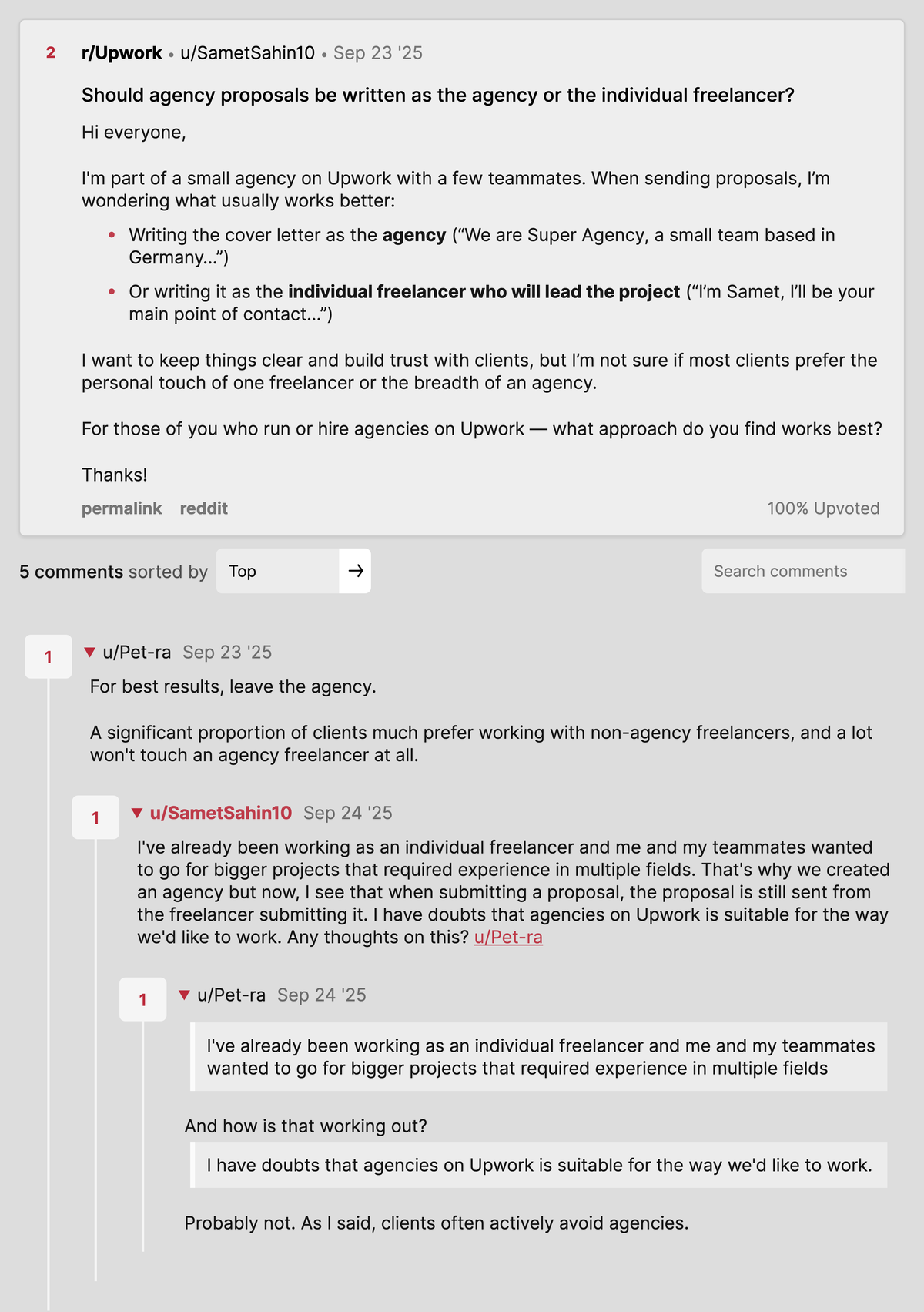
r/Upwork, 23 September 2025. Pet-ra's answer to the agency-vs-solo proposal question: a significant share of clients prefer non-agency freelancers, and some will not touch an agency freelancer at all. Source thread.
Should you create an Upwork agency account right now?
Most "should I start an agency" articles give you a vague checklist. This calculator scores your actual readiness based on the five factors that predict whether an agency account will increase or decrease your revenue in the next 90 days.
Interactive Tool
Agency Account Readiness Calculator
Answer 5 questions. Get a score from 0 to 100 and a specific recommendation.
What an Upwork agency account actually is (and is not)
An Upwork agency account is a separate business profile layered on top of your existing freelancer account. It is not an upgrade, and it is not a replacement.
You keep your solo freelancer profile and get a second, agency-branded profile with its own JSS, reviews, portfolio, and team roster.
The distinction matters because the two profiles compete in different pools. Your freelancer profile competes against other individuals; your agency profile competes against other agencies.
Upwork’s own documentation defines the agency as “a group of freelancers who team up to offer services together under one Upwork profile,” and confirms each freelancer can create only one agency.
Creating an agency does not transfer your existing JSS, reviews, or earnings history to the agency profile. You start at zero.
Clients filtering by "Top Rated" or "90%+ JSS" will not see your new agency profile until it earns its own track record.
The real shift is contract size. Agencies signal capacity, redundancy, and process.
A solo freelancer applying to a $10K project is competing against ten other solos. An agency with a visible team roster and a portfolio of completed multi-person projects is playing a different game.
Agency Basic vs Agency Plus: which plan you actually need
This is the decision most people get wrong. They default to Agency Plus because it sounds like the "real" version.
If you cannot guarantee 20+ hours per week of work for your team, you are paying $20/month to bid on jobs you will not win with a zero-review agency profile.
- Work on current active projects
- Accept invites from Enterprise clients
- Limited Uma AI access
- Cannot bid on new projects
- Cannot buy Connects
- Cannot accept non-Enterprise invites
- Buy Connects ($0.15 each)
- Bid on new projects
- Accept invites from any client
- Availability badges for members
- Hide agency earnings
- Full Uma AI access
Per Upwork's Agency Plus documentation, the free Agency Basic plan lets you work on existing contracts and accept Enterprise invites. That is it.
You cannot submit proposals, boost profiles, or purchase Connects without Plus.
If you already have Enterprise clients inviting you through your personal profile, you can start on Agency Basic to test the waters. Move one active contract to the agency profile to seed your first review, then upgrade to Plus once you are ready to bid actively.
Exclusive vs non-exclusive members: the decision that kills most new agencies
When you invite someone to join your Upwork agency, you choose between two membership types. This choice directly affects your margin, your member retention, and your agency's JSS score.
Locked to your agency. Cannot work solo or join other agencies on Upwork.
- Their JSS and hours count toward your agency
- You control their visible hourly rate
- They cannot see your client markup
- You must keep them busy or they churn
Keep their solo profile. Can work independently and join other agencies.
- Choose per-proposal whether to bid as agency or solo
- Build their own client base when you are slow
- Lower commitment, lower churn risk
- Start here for your first 3 to 5 hires
The mistake I see weekly in GigRadar's data: founders mark their first three hires as exclusive, then spend the next two months unable to give them hours. The members churn.
The agency JSS tanks because of closed contracts with no work logged.
Start non-exclusive by default. Upgrade a member to exclusive only once you can guarantee 20+ hours per week of work for them consistently.
Per Upwork's agency freelancer documentation, you can change membership type at any time.
Decision Framework
When to flip a member from non-exclusive to exclusive
How agency payments actually work (the part nobody explains)
Every payment on an agency contract goes to the agency account, not to the freelancer who did the work. The agency owner is responsible for paying members outside of Upwork.
This is the single most misunderstood aspect of Upwork agency accounts.
Hourly contracts auto-bill weekly; fixed-price milestones release on approval. Upwork deducts the service fee (0% to 15%) before depositing.
The money goes to the agency's payment method, not the individual member's. The agency owner has full control over withdrawals.
Upwork does not facilitate or protect agency-to-member payments. You handle payroll, tax documentation, and currency conversion yourself.
Agency member payments are NOT protected by Upwork. If you promise a team member 60% of contract revenue and then don't pay, Upwork will not intervene.
Get your payment terms in writing before adding anyone. A simple contractor agreement specifying percentage, payment schedule, and currency is sufficient.
This is why setting up a separate business bank account from day one is not optional. Route all Upwork agency payouts to a business account, not your personal checking.
Upwork agency account fees: what you actually pay in 2026
The fee is the same for agencies and solo freelancers. Upwork moved every contract to a variable 0% to 15% service fee in May 2025, and that applies regardless of whether you are solo or agency.
But the headline fee is not the real cost. When you add Connects burn, wasted proposal labor, the $20/month Agency Plus subscription, and withdrawal fees, the true agency tax typically lands between 22% and 34% of gross contract revenue.
The advantage of agency accounts is not lower fees. The advantage is access to larger contracts where the fee percentage is the same but the absolute margin per deal is 3x to 5x higher.
An agency closing a $8,000 fixed-price project at 12% keeps $7,040. A solo freelancer closing a $2,000 project at the same rate keeps $1,760.
How to set up an Upwork agency account (12-minute walkthrough)
The setup process takes about 12 minutes if you have your logo and tagline ready. Upwork's approval window is 1 to 3 business days.
Go to Settings, then Contact Info
From your logged-in freelancer account, click your avatar and open Settings. Select "Contact info" from the left sidebar.
Per Upwork's help docs, you can only create one agency account per set of credentials.
Click "New Agency Account" under Additional Accounts
Name it carefully. Upwork lets you change the display name later but not the URL slug.
Aim for a short, niche-specific name: "Kepler Shopify" beats "Kepler Digital Solutions" every time. A clear niche in the name filters out irrelevant clients before they even open your profile.
Choose Agency Basic or Agency Plus
Agency Basic is free but cannot bid. If you plan to submit proposals immediately, go Plus ($20/month).
Complete the profile
Logo, tagline, description, portfolio. The first two lines of the description are the only things clients see in search, so treat them like a headline.
Follow the same rules as our Upwork profile optimization guide.
Submit for Upwork review
Upwork reviews agency applications within 1 to 3 business days. Until approval, you can still bid through your personal freelancer profile.
For the full deep-dive on agency profile setup, portfolio strategy, and team configuration, see our complete guide to starting a freelance agency on Upwork.
Agency roles and permissions: who can see what
Upwork agency accounts have four distinct roles. Getting these wrong means your team members can see client billing rates (your markup) or, worse, cannot submit proposals when you need them to.
The business manager role is your salesperson: they can browse jobs, submit proposals using any team member's profile, and manage active contracts. Exclusive members cannot see the rate you charge the client, which is how you maintain a markup without friction.
How to earn Top Rated and Top Rated Plus as an agency
Agency badges work differently from freelancer badges. Per Upwork's agency documentation, the thresholds are agency-level, not individual.
The fastest path to Top Rated: move one active high-value solo contract to the agency profile. That seeds your agency with both revenue history and a client review in a single action.
Five mistakes that kill Upwork agency accounts in the first 90 days
In GigRadar's agency course, Vadym walks through the most common failure modes. The pattern is consistent: agencies fail not because of Upwork's structure, but because founders apply freelancer instincts to a business model that requires different operational discipline.
From GigRadar's Agency Success Course: Rookie Traps for New Agencies
Creating the agency before you have work to give it
A brand-new agency profile with zero reviews, zero earnings, and one member (you) is invisible to clients filtering by reputation. You are now splitting your bidding effort across two profiles, winning less on both.
Making all members exclusive from day one
Exclusive members are locked to your agency. If you cannot fill their hours, they sit idle, lose motivation, and leave.
Copy-pasting your off-platform playbook
ArchiCGI, .article-body a 3D studio in GigRadar's course, had a 70% to 80% close rate off-platform. They landed on Upwork, sent clients links to their external shop, got ghosted, and Upwork flagged them for external solicitation.
Not seeding the agency profile with a transferred contract
Bids submitted under a brand-new agency profile with zero reviews get filtered out. Move one in-flight solo contract to the agency profile to get the first public review.
Skipping legal and tax setup until "later"
Upwork does not care whether you have a registered company, but the tax reporting on agency earnings goes to the agency manager. If you pay members in multiple countries, that is your problem, not Upwork's.
A US LLC, UK Ltd, or Polish sp. z o.o. gives you legal separation. Check Upwork's tax reporting page for W-9/W-8BEN requirements.
Agency proposal template that addresses the "why not solo?" objection
When a client sees an agency bid, their first instinct is skepticism: who will actually do the work, and is this agency just a middleman adding a markup? Your proposal must neutralize those concerns in the first four lines.
The key line is "I'll be the [role] on this project, and I'm the person you'll talk to throughout." It kills the middleman objection before the client even forms it. For more proposal templates that hit 15%+ reply rates, see our dedicated guide.
Free for Upwork agencies
Stop splitting your team across two profiles
GigRadar scans Upwork jobs for your agency's exact niche, filters by budget and payment-verified clients, and lets your business manager send targeted proposals without burning Connects on scatter-shot bids.
Get Your Free Agency Audit →When upgrading to an agency account actually makes financial sense
The decision to create an Upwork agency account is a financial one, not an aspirational one. Based on patterns in GigRadar's data across 3,000+ agencies, here is when the math works.
The Agency Account Decision Matrix
$10K+ trailing 12-month earnings AND 2+ team members AND turning down work due to capacity limits AND average contract $3K+
$5K to $10K earnings AND 1 team member AND occasionally turning down work AND considering niching down
Under $5K earnings AND no team AND not at capacity AND generalist positioning. An agency account will hurt, not help.
The Grandz agency (a Shopify development shop with $2M+ earned on Upwork) ran a split-test: manual bids vs GigRadar-targeted bids. In three weeks they closed $21,000 in new revenue, .article-body a 250% growth spike.
The point is not the tool. An established agency with a clear niche and enough volume to test systematically will always outperform a solo freelancer guessing.
If you are managing Connects costs, tracking algorithm changes, and using automation that does not get you banned, an agency account is the next logical step. But only when the fundamentals are in place.
The agency account setup checklist (save this)
Print this or bookmark it. Every item below is something agencies forget in the first week and regret by month three.








