

🎬 Upwork RSS Feed Is Dead — Full walkthrough of why Upwork killed RSS feeds and the 4-tier alert stack agencies use now. Watch on YouTube
TL;DR
Upwork officially discontinued RSS feeds on August 20, 2024. If you're still searching for how to set up an Upwork RSS feed, the feature no longer exists.
The real reason was anti-circumvention: bots using RSS to auto-bid were flooding clients with low-quality AI proposals. This article covers what RSS did, why it died, and the 4-tier alert stack agencies use now to replace the speed advantage RSS once gave. Includes a free Job Alert Coverage Calculator.
On August 6, 2024, Upwork sent an email to every freelancer who had accessed an RSS feed in the previous 90 days. The email was two paragraphs.
The first said "beginning August 20, Upwork will no longer support RSS feeds." The second recommended "saving searches to your Job Feed."
That was it. Two weeks notice to dismantle a workflow that thousands of agencies had spent years building.
"It's not going to ever come back. Anti-circumvention seems to be the reason. Kings don't have time to cope or hope. We adjust accordingly."
— Adam Palmer, $2M+ Upwork freelancer · source
His adaptation plan included dedicated tablets running the Upwork feed 24/7 and VAs manually forwarding high-value jobs.
If you're landing on this article because you Googled "upwork rss feed" hoping to set one up: you can't. The feature is gone.
But the underlying problem it solved (getting to good jobs before 47 other agencies do) is still the single most important operational challenge on the platform.
What the Upwork RSS feed actually did (and why agencies miss it)
The Upwork RSS feed was a standard XML endpoint tied to your saved searches. You'd configure a search (say, "Shopify development" + fixed-price + $5K+ budget + payment verified), save it, click the three-dot menu, select "RSS," and get a URL.
That URL updated every time a matching job was posted. Plug it into Feedly, Zapier, n8n, Slack's built-in RSS app, or any RSS reader, and you had a real-time pipeline of jobs delivered to whatever tool your agency already lived in.
For agencies, RSS feeds solved three specific problems that Upwork's native interface did not.
Centralized monitoring across multiple saved searches
An agency managing a React team, a WordPress team, and a design team could run 6-8 RSS feeds into a single Slack channel, triaged by a VA or operations manager.
Integration with existing project management
Agencies piped RSS items into Trello boards, Notion databases, and Airtable bases using Zapier or n8n. A new Upwork job became a card in the "New Leads" column automatically. The VA scored it, moved it to "Draft Proposal," and a freelancer picked it up.
Speed
RSS feeds updated within minutes of a job posting. Agencies monitoring feeds during business hours could submit proposals within 10-15 minutes of a job going live. On Upwork, the first 5 proposals get disproportionately more views, so that speed advantage translated directly into higher reply rates.
Why Upwork killed it (and the real reason behind the PR answer)
Upwork's official line was that RSS feeds are "outdated functionality" that "lacks personalization, multimedia support, and compatibility with modern browsers." That's technically true: RSS is a 1999 standard that delivers plain text and links.
But the real driver was anti-circumvention.
RSS feeds had become the backbone of an entire ecosystem of automation tools. Some were legitimate (Zapier workflows routing jobs to Slack).
Others were auto-bidding bots that scraped the RSS feed, generated a proposal with GPT, and submitted it within seconds of a job posting.
Clients noticed. Upwork's community forums from mid-2024 are full of client complaints about receiving 20+ identical-sounding proposals within minutes of posting a job.
Many of those proposals were clearly AI-generated, hitting the same structure: compliment the project, list qualifications, close with "looking forward to discussing."
The RSS feed was the input valve for bot-generated proposal spam. Killing it didn't eliminate bots entirely, but it removed the easiest programmatic access point to real-time job data.
There's a reasonable argument that Upwork's decision hurt legitimate agencies more than it hurt bad actors. Bots adapted (switching to browser automation and Chrome extensions). The agency owner who had a clean Zapier-to-Slack workflow lost it overnight.
14 days
That's all the notice Upwork gave before killing RSS feeds. The email went out August 6. The feeds went dark August 20. Third-party job-alert tools built on those feeds had to pivot their entire business model in two weeks.
What Upwork wants you to use instead (and where it falls short)
Upwork's recommended replacement is saved searches combined with their native notification system. Here's what you get.
Saved searches on the platform work the same way they always did. You configure filters (keyword, category, budget, experience level, client history, payment verified, number of proposals) and save the search.
Push notifications via the Upwork mobile app ping you when a new job matches a saved search. You need the app installed with notifications enabled.
Email alerts send periodic digests or instant notifications for saved searches. You configure the frequency in your notification settings.
For a solo freelancer checking Upwork twice a day, this is adequate. For an agency running 8-12 saved searches across multiple niches with a team of bidders, it breaks down.
If your agency does less than $5K/month and you're the only person bidding, saved searches work fine. If you have 3+ people involved in your proposal pipeline, you need more infrastructure.
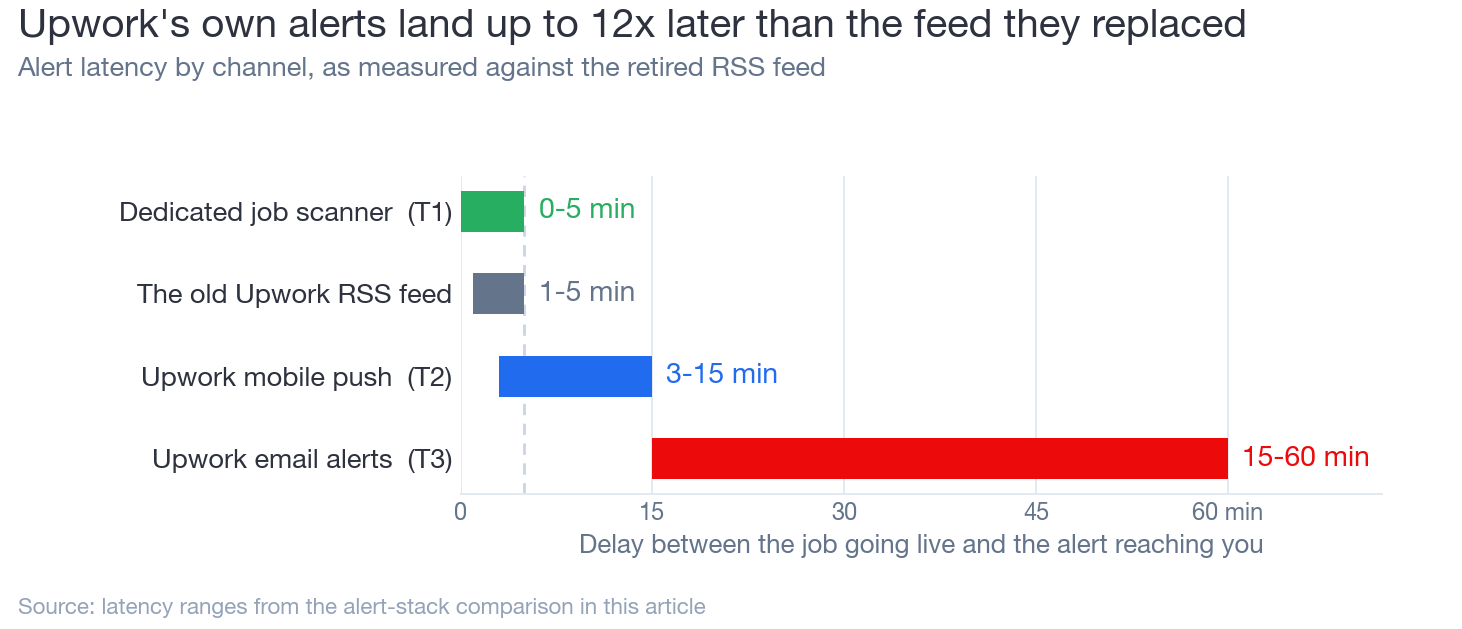
The 4-tier alert stack that replaced RSS for serious agencies
The agencies that adapted fastest after August 2024 didn't look for a 1:1 RSS replacement. They built a multi-channel alert system that's actually faster and more filterable than RSS ever was.
Here's the stack, ordered by response speed.
Dedicated job scanning tool (0-5 min alerts)
Monitors Upwork continuously for new jobs matching your criteria. Pushes alerts to Slack, Telegram, email, or webhooks. Replaces RSS functionally.
Key upgrade over RSS: Can draft a customized proposal alongside the alert, not just deliver a link.
Upwork mobile push notifications (3-15 min)
Keep the Upwork app on your phone with push enabled. Configure 3-5 saved searches for your highest-value niches. Set quiet hours.
Role: Backup layer. Catches edge cases the scanner misses.
Email alerts for batch processing (15-60 min delay)
Set up instant email alerts for your top 2-3 saved searches. Route them to a dedicated inbox or Slack channel via email forwarding.
Role: Searchable archive + catch-all for jobs you skimmed past in real-time notifications.
Manual feed scanning (2x daily, 15 min each)
Log into Upwork and scan your saved searches manually twice a day. Catches anything the other three tiers missed.
Bonus: Keeps your account active in Upwork's ranking algorithm, which favors freelancers who are actively using the platform.
How GigRadar's scanner replaces RSS (and does more)
GigRadar's scanner is the Tier 1 replacement that most closely mirrors what RSS did for agencies, with three upgrades that RSS never had.
Upgrade 1: Smart filtering beyond keywords. RSS matched on keyword and basic parameters. GigRadar's scanner filters on client spend history, contract completion rate, payment verification status, and proposal count. You don't just get "Shopify development" jobs. You get Shopify jobs from clients who've spent $10K+ and have a 90%+ completion rate.
Upgrade 2: Custom proposal drafts. In GigRadar's agency course, Vadym walks through building scanners that don't spit out generic "I'm a web developer with 10 years of experience" openers. The scanner prompts reference specific competitors in the client's niche, pull pain points from the job description, and generate cover letters that sound like a human wrote them.
Upgrade 3: Team pipeline. RSS gave you a link. Your VA had to open it, read the job, decide if it was worth bidding, draft a proposal, and submit. GigRadar collapses that into: scanner finds job → generates draft proposal → team member reviews and submits. The entire pipeline from job posted to proposal submitted can happen in under 10 minutes.
3,000+
Agencies use GigRadar's scanner to monitor Upwork jobs. The scanner mimics real user behavior (no browser automation, no scraping, no login credential sharing), so it operates within Upwork's Terms of Service.
Job Alert Coverage Calculator
Most agencies don't realize how many hours per day they're actually exposed to new job alerts. This calculator shows you the gap between your current setup and full coverage.
Select which alert methods you currently use, input your active hours, and see your coverage score.
Free Tool: Job Alert Coverage Calculator
Which alert methods do you use?
Active monitoring hours per day
8 hours / day
Number of saved searches / scanner filters
42%
Coverage Score
~14
Jobs Missed / Day
25 min
Avg. Response Time
Add a dedicated scanning tool to cut your average response time from 25 min to under 5 min.
The hidden upside of RSS dying
Here's what most articles about the RSS discontinuation won't tell you: the removal of RSS feeds actually improved proposal quality on the platform.
Before August 2024, a significant chunk of proposals on competitive jobs were bot-generated slop. Auto-bidders would scrape the RSS feed, run the job description through a template, and submit within 60 seconds.
After RSS died, the bot ecosystem had to get more sophisticated (and more expensive) to maintain the same speed. Many of the low-effort auto-bidders simply stopped working.
Post-RSS Silver Lining
Fewer bots
= higher proposal-to-interview rate
For agencies that adapted by building a proper alert stack, the competitive landscape actually improved. Reply rates on proposals increased after Q3 2024 for well-targeted agencies.
For agencies that adapted by building a proper alert stack (not just waiting for Upwork's slow native notifications), the competitive landscape actually improved. Fewer bots + faster response time = more interviews per proposal sent.
Building your post-RSS job monitoring system: a practical checklist
If you're migrating from an RSS-based workflow or building a monitoring system from scratch, here's the operational checklist.
Post-RSS Agency Alert Setup Checklist
The job monitoring problem isn't technically hard. RSS made it trivial, and its removal made it slightly harder.
But the agencies that treated the RSS discontinuation as an opportunity to upgrade (rather than a loss to mourn) are now running tighter, faster proposal pipelines than they ever did with a Zapier-to-Slack RSS workflow.
The real lesson from the RSS feed saga
Never build your core business process on a platform feature that the platform has no incentive to maintain. Upwork's incentive is to keep you on upwork.com. Your incentive is to get jobs routed to wherever your team actually works. Those incentives will always diverge. Use tools that sit outside the platform so you're not one email away from losing your entire pipeline. (See our breakdown of what you can and can't build with Upwork's API.)
Free for Upwork agencies
RSS feeds are gone. Your pipeline doesn't have to be.
GigRadar's scanner monitors Upwork 24/7, filters jobs by client quality, and drafts custom proposals. No browser extensions. No login sharing. No ToS violations.
Get Your Free Agency Audit →







