
TL;DR
- Upwork now caps your profile at 20 skill tags, up from the old 15. Those 20 are the only field on your profile the search algorithm reads as a structured keyword index.
- Specialized profiles were deprecated. There is no longer a second 15-tag bucket per niche to lean on. Your 20 main-profile tags are the whole search surface.
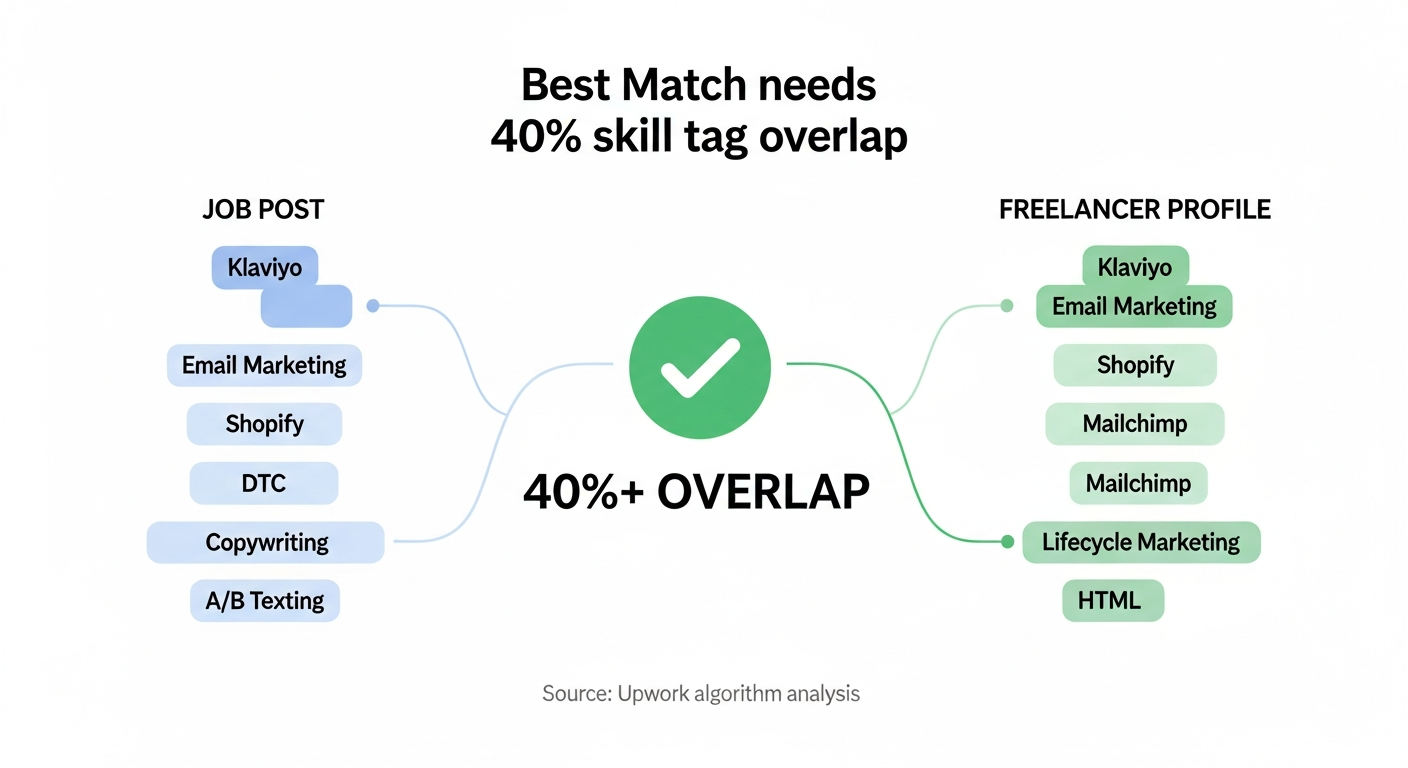
- Best Match (the feed clients see) requires roughly 40% skill-tag overlap between your profile and the job. Generalist tag lists fail this threshold on every niche search.
- Most agencies waste 4–6 of their 20 slots on broad service terms ("Digital Marketing", "Web Development") that have 30,000+ competing profiles and zero specificity.
- The fix: copy skills from the top 20 paid profiles in your exact niche, then add 3–5 platform-specific tags (Klaviyo, Webflow, Next.js) clients filter on.
When Upwork's signup flow asks "What skills do you offer clients?", you now get 20 tag slots. They quietly raised the cap from 15 and removed specialized profiles at the same time, which means the entire search surface lives on one profile now. Every other field (title, overview, portfolio captions) is unstructured text the algorithm tries to interpret. The skills section is the one field Upwork indexes as exact-match tags. That's why one wrong tag swap can move you from page 3 of the Talent search to page 1 without changing anything else.
Most agency owners I talk to picked their skills the day they made the profile and never touched them again. They're losing invites for the same reason a poorly-tagged YouTube video gets buried: the algorithm has nothing structured to match against. And those still running on 15 are leaving five free slots on the table.
The 20 tags are your search index, not a resume
Upwork's official documentation is unusually clear on the mechanism: "Prospective clients search for specific skills, and our algorithms use your skills information to match you with projects." (Upwork Help: Add skills)
That sentence is doing two things at once. First, clients filter Talent search by skill tags. Your tags are the SQL WHERE clause that decides whether you appear at all. Second, when freelancers open their job feed, Upwork's recommendation engine sorts "Best Matches" using skill-tag overlap as one of the highest-weighted signals (analysis of Upwork's 2026 ranking factors).
This is why a freelancer with a "PHP, MySQL, WordPress" skill set never sees the Shopify Liquid jobs they could actually do. The tags don't overlap, so Upwork's machine learning never surfaces those jobs to them.
A third-party Chrome extension that reverse-engineered the public Best Match signal found that a job is labeled a "Best Match Candidate" only when at least 40% of the job's listed skills overlap with the freelancer's profile skills (source). Upwork hasn't confirmed the exact threshold, but the directional signal matches what I see in GigRadar's pipeline data: agencies with niche-clustered tags get 2–4× more invites than agencies with scattered generalist tags. The new 20-tag cap raises the ceiling on overlap, but only if you actually fill the extra slots with niche tags, not filler.
Pick your 20: the interactive skills picker
Interactive Tool
Skills Picker: industry-specific tag sets
Pick your agency type. Get a ready-to-paste, 20-tag set tested against actual Upwork client search behavior.
The 10 tag sets above are seeded from two sources I trust over generic SEO tools: Upwork's own official "Choose the best skill tags" guidance, and the visible skill tags on the top 20 profiles I pulled for each vertical from Upwork's Talent search ranked by total earnings. The extra five slots over the old 15-cap go to platform-and-tool specifics that used to live in specialized profiles.
How Upwork's algorithm actually reads your skills
Upwork has published one video on its matching system, in which a product manager says: "The skills and qualifications you add to your profile are key to how we determine, out of the hundreds of thousands of jobs posted on Upwork, which ones may be the most relevant and interesting for each job search."
That's the cleanest statement of intent we have. Behind it, three separate ranking decisions read your skill tags differently.
When a client posts a job, Upwork ranks freelancers to suggest as invitees. Skill-tag overlap is the heaviest input: a job tagged "Klaviyo, Email Marketing" surfaces profiles with both tags present and recent in their history.
Freelancers see jobs sorted by predicted fit. Skill-tag overlap is the highest controllable signal. Upwork tracks which jobs you apply to and tilts your feed toward similar tag clusters over time.
When the client opens their inbox, proposals sort by predicted contract success. Your skill tags here determine the bucket Upwork places you in (agencies, freelancers, "Top Rated in [skill]") and that bucket competes against itself for the first 10 slots.
If your tags miss the niche, none of the three layers work in your favor. You're invisible in invites, buried in the feed, and ranked below higher-tag-match competitors in the client's inbox.
The four mistakes that turn skill tags into noise
Across the agencies I've reviewed, the same four mistakes show up over and over. The bump to 20 makes the cost of these mistakes higher, not lower, because the extra slots get spent on filler.
Mistake 1: tagging the umbrella, not the niche
"Digital Marketing" has 200,000+ competing profiles. "Klaviyo Email Marketing" has under 5,000. The umbrella tag pretends to cast a wider net but actually puts you in a pool too large for Upwork's algorithm to rank you in.
Don't tag
Digital Marketing Marketing Web DesignTag instead
Klaviyo Email Marketing B2B SaaS Lead Generation Webflow DesignerMistake 2: generic platform names with no specialty
"WordPress" alone tells the algorithm nothing about whether you build custom themes, do migrations, or run plugin development. The Upwork tag library actually has more specific options: WordPress Theme, WordPress Plugin, WooCommerce, WordPress Migration. Use them.
Mistake 3: padding with skills you don't actually do
Tagging "Data Entry" because "more tags = more visibility" is wrong on two counts. First, irrelevant tags drag down your relevance score: the algorithm flags semantic incoherence and buckets you as a generalist. Second, when Upwork's machine-learning surfaces a data entry job to you, the reply rate is microscopic and your apply-to-interview conversion suffers, which feeds back into a worse profile signal long-term. The new 20-tag cap makes this trap easier to fall into. Just because you have more slots does not mean you should fill them with weaker tags.
Mistake 4: setting skills once, never updating
Upwork's skill library grows monthly. Tags like "LangChain", "Vercel", "Klaviyo Flows", "Webflow Cloneable" didn't exist in 2023. If your skills are unchanged since you joined, you're missing whatever tags clients started searching for last quarter, and you're still capped at 15 by your own neglect when the system gives you 20. Upwork's own YouTube guide recommends auditing skills every 1–3 months. Most agencies audit them once, ever.
How to find the skills clients are actually searching for
The "Nail Your Upwork Profile" lesson in our Agency Success Course walks through the exact workflow our top-decile teams use to harvest skill tags from competing profiles. The walkthrough was recorded under the old 15-cap, but the harvest workflow is unchanged. Just pull 20 tags instead of 15.
From GigRadar's Agency Success Course, "Nail Your Upwork Profile" lesson. Skill-tag harvesting starts around the section on keywords and skills as search engine fuel.
The condensed process:
From the same login, toggle to your client profile. This unlocks Talent search filters freelancer accounts don't see, including the "sort by total earnings" view.
For a Shopify agency: "Shopify" + "DTC". Sort by total earnings descending. Open the top 20 profiles in new tabs.
In a spreadsheet, list every skill tag that appears on 3+ of the 20 profiles. That's your candidate list. The tags clients in this niche have already proven they search for.
Order them by frequency. The one that appeared on the most profiles goes first. Upwork's "How you arrange them here is how they will appear in your profile" note (source) means the first 5 are the ones clients see in the preview card.
The category recipe: why niche skills compound on reply rate
When we analyzed 133,872 outbound proposals from GigRadar's pipeline between Dec 2025 and Feb 2026, the reply rate by category looked like this. The top reply rates concentrate in categories where niche-specific skill tags dominate the profile.
| Category | Median reply rate | What niche tags drive it |
|---|---|---|
| Design & Creative | 20.2% | Figma, Brand Identity, UI/UX Design, Webflow Designer |
| Sales & Marketing | 17.9% | Klaviyo, Google Ads, Lead Generation, B2B Marketing |
| Web, Mobile & Software Dev | 14.6% | Next.js, Shopify Liquid, React Native, Tailwind CSS |
| Data Science & Analytics | 14.2% | LangChain, OpenAI API, Tableau, ETL Pipeline |
| IT & Networking | 10.7% | AWS, DevOps, Kubernetes, Terraform |
| Accounting & Consulting | 10.1% | QuickBooks, Financial Modeling, Bookkeeping, US GAAP |
| Admin Support | 6.1% | (saturated, niche tags have lower ceiling here) |
Source: GigRadar pipeline data, Dec 2025–Feb 2026. n=133,872 outbound proposals.
The pattern is consistent: categories where the profile-level skill tags are tightly clustered around a tool or platform (Klaviyo, Figma, Next.js) outperform categories where the most common tags are broad services. If your tags say "Marketing" or "Web Development" without a tool layer, you're competing in the bottom half of every category on this table.
Specialized profiles are gone. Your main profile is the whole surface.
Specialized profiles used to give you a second 15-tag bucket per niche. Upwork removed them as part of the same UI revamp that lifted the main-profile cap to 20. The trade is real: you lose 30 niche slots (two specialized profiles at 15 each), and you gain 5 on the main profile. The math only works if you actually used specialized profiles, which most agencies never did.
Audit which tags lived on your specialized profile that aren't on the main one. The 5 extra slots are your chance to pull the highest-performing specialized tags up. Klaviyo, Shopify Plus, B2B SaaS Lead Generation. Anything tool-specific that was buried on a sub-profile clients had to click through to find.
The order matters: what to put first
Upwork displays the first 4–5 skill tags in the profile preview card that shows up in Talent search results. Clients see those before they click through. The remaining 15 tags are still indexed for search, but they don't influence the preview.
The optimal ordering is the one Upwork's own help docs imply: most-searched-for first. For a Klaviyo email agency, the first three should be "Klaviyo, Email Marketing, Email Campaign Setup", not "Marketing Automation, Audience Segmentation, A/B Testing" (which are tags clients use deeper in their search, not at the entry point).
Free for Upwork agencies
Get our team to audit your skill tags
Our Upwork Business Manager operates the full pipeline for 700+ agencies. In your free audit, we'll show you which of your current 20 tags are pulling weight and which 3–5 swaps would put you in the right Best Match bucket.
Get your free agency audit →The 10 industry skill sets ranked by tag specificity
This is the ranked list the picker tool above generates, ordered by how niche-dense the tag set is. That correlates with both Best Match overlap and proposal reply rate in our pipeline data.
| # | Agency type | Anchor tags (first 5) |
|---|---|---|
| 1 | Email Marketing / Klaviyo | Email Marketing, Klaviyo, Email Campaign Setup, Email Marketing Strategy, Marketing Automation |
| 2 | Paid Ads / PPC | Pay Per Click Advertising, Google Ads, Facebook Ads Manager, Search Engine Marketing, Campaign Management |
| 3 | SEO Agency | Search Engine Optimization, On-Page SEO, Technical SEO, Off-Page SEO, SEO Keyword Research |
| 4 | UI/UX Design | UI/UX Design, User Experience Design, User Interface Design, Figma, Wireframing |
| 5 | Data / AI / Automation | Python, Machine Learning, Artificial Intelligence, Data Analysis, Data Visualization |
| 6 | Web Dev: React / Next.js | React, Next.js, TypeScript, JavaScript, Node.js |
| 7 | Web Dev: Shopify / E-commerce | Shopify, Shopify Theme, Liquid, Shopify Plus, Ecommerce Website |
| 8 | Web Dev: WordPress | WordPress, WordPress Theme, WordPress Plugin, PHP, WordPress e-Commerce |
| 9 | Content Writing | Content Writing, SEO Writing, Blog Writing, Article Writing, Copywriting |
| 10 | Video Editing | Video Editing, Adobe Premiere Pro, Adobe After Effects, DaVinci Resolve, Color Grading |
What skills do you offer clients on Upwork? Your 30-minute audit
The Skills section audit takes 30 minutes. Block the time, do it once, and you've moved every part of your Upwork pipeline at the same time. Invites, Best Match feed, proposal ranking. Three steps:
Use the client-account search trick above. Spreadsheet column A is your tags, column B is the top competitor's. Count the overlap.
The bottom 5 are the tags you have but the top competitors don't. They're almost certainly underperforming relative to the slot they occupy.
With specialized profiles gone, every slot matters more. Whichever tags appeared on the most competitor profiles go first. The rest filled in by frequency. No empty slots.
Re-audit every 90 days. Upwork's tag library shifts faster than most agency owners notice, and the agencies who let their tags drift are the ones who report "Upwork is dead" while their better-tagged competitors keep getting invites. For deeper agency-side profile work, see our companion article on Upwork profile SEO and the profile optimization deep-dive on PVR and JSS.
If you want to skip the manual benchmarking and have our team do the cross-reference against the 700+ agencies running on GigRadar's pipeline, that's what the free agency audit covers. Your current 20 tags versus the top-decile tag set in your exact vertical.