

🎬 Best Upwork Automation Tool 2026: 5 Safe Categories vs Ban Risk. The five categories of Upwork automation that actually work, plus a free safety scorer for any tool. Watch on YouTube
The 30-second answer
- The phrase "best Upwork automation tool" is misleading. The best automation tool for an Upwork agency is the one that does not touch upwork.com from your account at all.
- Upwork's policy team flags four categories of tools by name: feed scrapers, auto-refreshers, macro recorders, and userscript managers. Pricing them at $30 to $100 per month does not change what they do.
- Five categories of tooling are compliant: AI proposal drafting, performance analytics, off-platform CRMs, scanner-style alert services that run server-side without a browser session, and the Upwork Business Manager (BM) model where an invited BM submits on the agency's behalf.
- Use the 7-question safety scorer below to audit any tool before you wire it into a freelancer's account.
- If you want submission automation without your agency carrying the ban risk, the BM model is the only architecture Upwork actually supports for agencies.
Most agency owners walk into the search for an Upwork automation tool looking for the same thing: a tool that fires off proposals overnight, fills the editor, hits Submit, and lets them sleep. That product exists. It also gets your account banned in under six months.
Upwork suspended 23% more accounts for automation abuse in 2025 than the year before. The freelancers losing those accounts were not running custom bots from the dark web. They were paying real subscription prices for browser extensions sold as "agency tools," and Upwork's abuse team was flagging them in seconds.
This article is the buyer's guide I wish someone had shown me five years ago: the categories that exist, what each one actually does to your account, and how to pick the one that survives a Trust and Safety review.
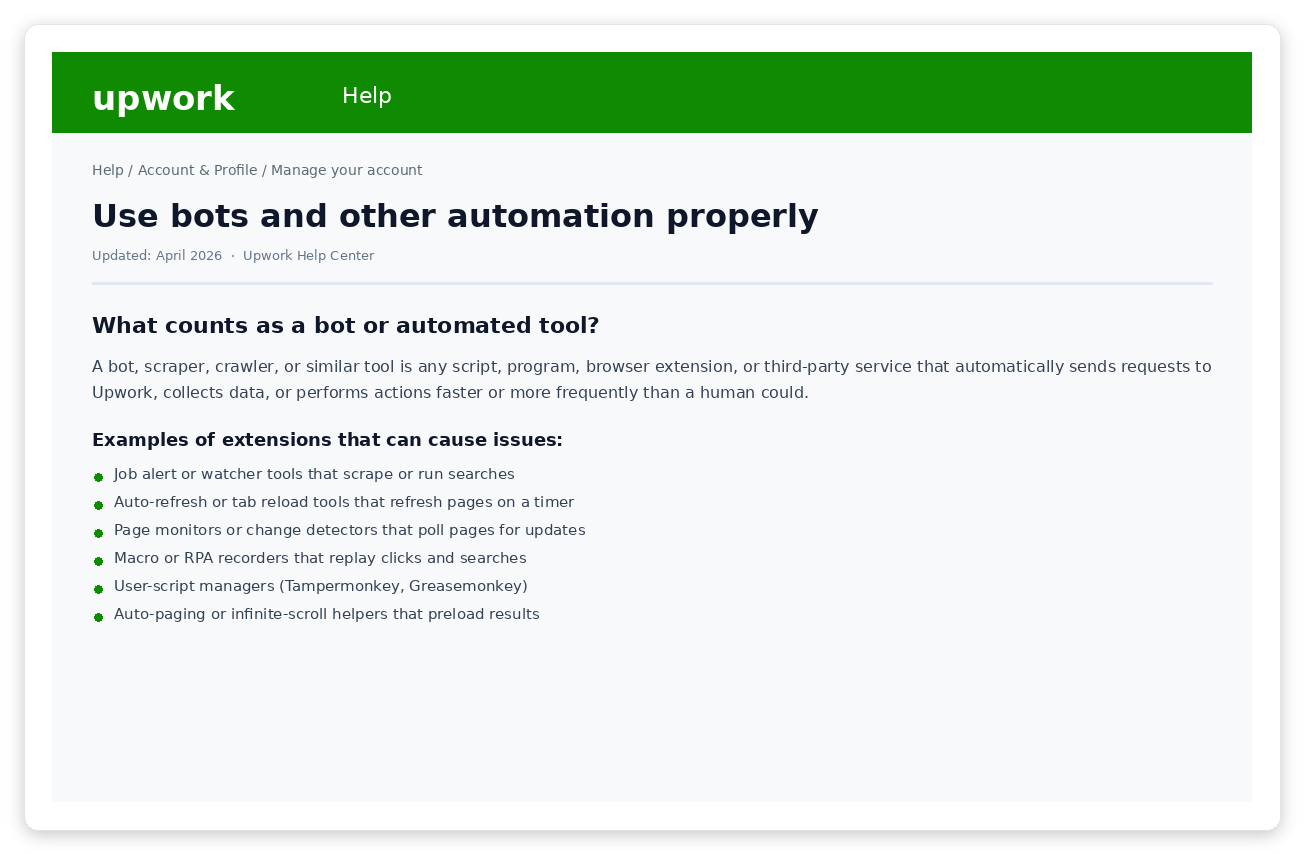
Upwork's Help Center page on automation. Quietly updated in late 2024 to name specific browser extension categories by behavior, not vendor name. Source: Upwork Help Center.
What Upwork actually counts as "an automation tool"
Upwork's definition is more aggressive than most agencies assume. From the Acceptable Use page:
The page goes on to list seven extension behaviors that get flagged by name. These are the ones that get an account suspended without a human ever reviewing the case.
Job watchers and feed scrapers
Extensions that scrape the job feed on a timer, then push matches to Slack or Telegram. Usually sold as "smart alerts" or "instant job notifications."
Auto-refresh and tab reload tools
Anything that reloads a job search URL on an interval. This hits Upwork's endpoints in a pattern no human produces.
Macro recorders and RPA extensions
Tools that record clicks and replay them. Includes auto-bidders that fill a proposal template and click Submit with no human review.
Userscript managers and auto-paginators
Tampermonkey or Greasemonkey scripts that paginate the job feed, auto-click "Load more," or extract client contact info from public profiles.
Page monitors and change detectors
Tools that poll Upwork pages on a schedule looking for budget changes, status updates, or new comments.
Multi-site research tools that include Upwork
Anything that fires queries across many sites at once with Upwork as one of them. The cross-site request pattern is itself the flag.
Background tab tools
Any extension that sends requests to Upwork while the tab is idle or in the background.
Watch the soft language
Sales pages for these tools use phrases like "smart alerts," "efficient browsing," "streamline your proposals." That is the category Upwork bans. If a tool reads or writes anything on upwork.com without you clicking, it falls into one of the seven buckets above.
The five Upwork automation tool categories agencies actually use
Strip out the marketing copy and the entire "Upwork automation tool" market sorts into five product categories. Four are safe when built correctly. One is the category Upwork explicitly bans, no matter who is selling it.
1. AI proposal drafting tools
Generate cover letter drafts based on a job description. The freelancer reviews, edits, and pastes the result into Upwork manually. Some run as desktop apps, some as web dashboards, some as standalone Chrome extensions that do not read upwork.com.
What to look for: No upwork.com permissions in the extension manifest. No "auto-fill the editor" feature. The output is text you copy yourself.
2. Performance analytics dashboards
Track reply rate, view rate, profile view rate (PVR), win rate, and cost-per-hire by job type and time of day. Data either comes from your own CRM logs or from Upwork's official reporting export. Never from scraping the platform.
What to look for: The vendor explains exactly where the data comes from. If they say "proprietary methods" or "we get the data for you," they are scraping. Walk away.
3. Off-platform CRMs and pipeline trackers
Standard sales CRMs (HubSpot, Pipedrive, Notion, Airtable) configured to track Upwork conversations once a contract begins. Compliant because none of them touches upwork.com on a timer.
What to look for: Manual entry is a feature, not a bug. The friction of typing is what keeps the tool off Upwork's radar.
4. Scanner-style alert services (server-side)
Services that watch the Upwork job feed on the server side, not from a freelancer's browser, and ping you when a high-fit job drops. The cleanest implementations consume Upwork's official RSS feeds or run from approved API keys, never from a session cookie scraped out of your browser.
What to look for: Ask the vendor in plain English where the job data comes from. If the answer involves your account, your cookies, or "magic," the alert is reaching Upwork through your fingerprint and the risk is yours, not theirs.
5. Business Manager (BM) submission services
Upwork has a native role called Business Manager. An agency invites a person, or a service operating its own real BM account, into the agency through Upwork's official invitation flow. Once invited, the BM can submit proposals on behalf of the agency's freelancers from the BM's own Upwork account. This is the same role used to onboard hired bidders or virtual assistants.
What to look for: The vendor operates its own real Upwork BM account, with a public Upwork profile and review history. They invite into your agency through Upwork's native flow. They never ask for your password, your session cookie, or a browser extension.
6. Auto-bidders and browser-based submission tools
Chrome extensions or desktop apps that fill the proposal editor on upwork.com and click Submit on the agency's behalf. Sometimes hidden inside an "AI proposal writer" feature that "helps you save time." The mechanism is the same: the agency's session is being used to submit without a human action.
What to look for: Any extension that asks for "Read and change all your data on upwork.com" permission. That permission line is the auto-fail.
Feature matrix: how the categories actually compare
Stack the six categories side by side and the picture is clearer. Anything that submits from your account or scrapes the feed sits in the red zone. Everything else is fair game.
Two patterns matter. First, anything that runs inside your browser session with permission to read or write upwork.com is a liability, no matter how clean the marketing copy is. Second, the Business Manager model is the only architecture where the risk is structurally separated from the agency account, because the BM is a different real Upwork account doing the submitting.
The 7-question Upwork automation tool safety scorer
Before you wire any tool into a freelancer's account, run it through these seven questions. Total score over 5 = stop. Score 3 to 5 = proceed with audit. Score under 3 = safe.
Free tool: Score any Upwork automation tool in 60 seconds
Answer the seven questions. The score updates live.
1. Does the tool require you to log into your Upwork account inside the tool itself?
2. Is it a browser extension (Chrome, Firefox, Edge) that runs on upwork.com?
3. Does the tool send, reply, or click anything in Upwork without you pressing Send manually?
4. Does it refresh, scrape, or pull data from the job feed on a timer using your session?
5. Does the vendor's marketing use the words "auto-bid," "auto-apply," or "auto-send proposals"?
6. Can the vendor explain in plain English where their job-feed data comes from (RSS, API, BM account)?
7. If proposals submit, do they submit from a different Upwork account (a real BM) than your agency's account?
0
How vendors hide that they are running the banned pattern
The hardest tools to evaluate are the ones that run a banned pattern but describe themselves in compliant language. Three rewordings to watch for.
"AI-powered job alerts"
If the alerts are scraping the feed from a server that uses your account session, the AI label does not change the architecture. Ask: where does the job feed data come from? If the answer is your account, you have a scraper.
"Smart proposal assistant"
If "smart" means the assistant fills the proposal editor on upwork.com and you click Submit, that is RPA, not assistance. The fill counts as an automated action even though you tap the final button.
"100% safe, no automation"
This phrasing is a red flag in the opposite direction. No tool that meaningfully helps with bidding does zero automation. The honest version is "automation that prepares work for human submission" or "automation that runs from our own BM account, not yours." If a vendor pretends there is no automation at all, they are either lying about the tool or selling a tool that does not work.
What we tell GigRadar customers in the agency course
In the "How to get banned on Upwork" lesson of GigRadar's Agency Success course, the instructor opens with a sentence I think every agency owner should write down before they evaluate any automation product:
The lesson lists the most common ban triggers across the 3,000+ agencies that have run through the GigRadar BM. The single most frequent cause is what Upwork calls "irregular activity," and the single most frequent root cause of irregular activity is exactly what this article warns against: a free VPN, a sketchy Upwork-related Chrome extension, a virtual assistant logged in from her own laptop, or some combination of the three.
The fix the course recommends is a written agency rule: no Upwork-related browser extension on any device that logs into the agency's accounts, ever. Sign it during onboarding. That single rule prevents most agency-level suspensions without any tool involved.
How GigRadar fits into this picture
GigRadar lives in category 5: a Business Manager submission service. We operate a real Upwork BM account as a company. When an agency signs up, they invite our BM into their agency through Upwork's native invitation flow, the same role they would use to onboard a hired bidder or in-house manager.
Behind the BM is the automation agencies want: a server-side scanner that filters jobs against rules the agency configures, AI proposal drafts grounded in the agency's history, and instant alerts when a high-fit job drops. The submission itself happens from our BM's own Upwork account, under our team's supervision, with our identity and our fingerprint.
If Upwork ever reviews a submission, they review our BM, not the agency's freelancer. Across roughly 3,000 agencies on this architecture, no agency-level account suspension has been attributed to GigRadar's tooling. The agency's freelancer profile is never touched, no browser extension, no credential sharing, no session cookie leaving the agency's machine. That is the property the BM model was designed for.
The compliance test
If a vendor cannot tell you, in one paragraph, which Upwork account submits proposals when their tool is running, they have not designed for compliance. The submitting account is the entire question. Either it is your agency's (banned), a separate real BM account (compliant), or there is no submission at all (the AI-drafting category).
See the BM model run on a real agency in 20 minutes
Filter, score, draft, and submit 500+ proposals/month without your freelancer ever touching a bot or extension.
Book a GigRadar demo →The buyer's decision tree
Pick one of three lanes based on your volume and team setup. Trying to mix lanes is what gets agencies into the ban zone.
Lane 1: Solo freelancer or 2 to 3 person agency
Stack: an AI drafting tool ($30/month) plus a server-side scanner if you want speed alerts ($79/month). Total cost: $50 to $150 per month. Submission stays manual: paste the AI draft into Upwork and submit yourself.
Why: at low volume, the time saved by automating submission is small, the ban risk is large, and a manual workflow with AI drafts is fast enough to compete.
Lane 2: 5 to 15 person agency, $20K to $80K/month MRR
Stack: a server-side scanner ($79 to $300/month) plus a CRM (HubSpot or similar, $50 to $200/month) plus an AI drafting tool. Submission: still the freelancers, but coordinated by the scanner's notification stack so the right person responds within the 10-minute window.
Why: this is the volume range where the scanner's alert speed delivers the biggest lift, and where multi-account browser extensions become the highest source of suspensions. Solve speed without touching upwork.com directly.
Lane 3: 15+ person agency, $80K+/month MRR
Stack: a Business Manager submission service ($400 to $2,000+/month, often performance-priced) plus your CRM. Submission: the BM submits on behalf of the agency's freelancers.
Why: at this volume, the time cost of human submission inside the 10-minute reply window becomes a real bottleneck, and a properly designed BM model gives you the throughput without putting the agency's main account on the line.
What to do this week
- Run the 7-question scorer above on every automation tool currently installed on any agency device. Anything scoring 5+ comes off the laptop today.
- Open
chrome://extensionson every freelancer's machine. Remove any extension with "Read and change all your data on upwork.com" permission unless it is published by Upwork itself. - Pick your lane from the three above based on volume. Do not mix Lane 3 (BM submission) with a separate auto-bidder. The whole point of a BM is to remove the bidder from your account.
- Write the one-paragraph agency rule banning Upwork browser extensions on any device that logs into agency accounts. Have every team member sign it.
- Document where each remaining tool gets its data. If the answer is your session cookie or your account, replace it with one whose source is the official RSS feed, an approved API key, or a separate BM account.
The agencies that scale on Upwork past $1M/year are not the ones running the cleverest bot. They are the ones who put the bot in a box that is not their main account.
FAQ
What is the actual best Upwork automation tool for an agency?
There is no single best Upwork automation tool. The right answer is a stack: AI drafting plus an off-platform CRM at low volume, a server-side scanner plus AI drafts at mid volume, and a Business Manager submission service at high volume. The wrong answer is anything that submits proposals from your agency's own browser session.
Are any browser extensions for Upwork actually safe?
Only ones that do not read or write upwork.com. AI drafting extensions that operate on a separate scratchpad page (you paste the JD in, copy the draft out) are fine. Anything with "Read and change all your data on upwork.com" permission is in Upwork's banned category, regardless of vendor.
Will an AI proposal generator get me banned?
Only if the AI also fires the Submit button. Upwork's policy explicitly allows AI for drafting and research as long as a human reviews and submits the final proposal. Use AI for the writing, do the click yourself.
How does the Business Manager model handle Upwork's reply rate algorithm if a different account is submitting?
Submissions from an invited BM count as the agency's activity inside the agency's pipeline. The BM is a role inside your agency, not a third-party submitting. Reply rate, view rate, and JSS are calculated against the freelancer or agency profile that owns the contract, not against the BM that submitted the proposal. Upwork built the role exactly so agencies could delegate bidding without distorting metrics.
What does GigRadar cost compared to a $79/month auto-bidder extension?
More upfront, less in expected loss. A $79 auto-bidder that runs a year before banning the freelancer carries an expected cost of $79 times 12 plus the $47K average annual income loss from a suspension, weighted by the probability of getting caught (which after Upwork's 2025 policy changes is high). The BM model carries no ban-risk expected loss because the submitting account is the BM, not the agency.
Is there a way to use Upwork's official API to automate bidding?
Upwork issues API keys to approved use cases, but the API does not expose proposal submission for general agency automation. The API is mostly for clients (job posting, hiring) and reporting integrations. For agency-side bidding automation, the BM model and AI drafting are the supported paths.
My agency already runs an auto-bidder. What is the safest way to switch?
Pause the auto-bidder for 14 days first. Continuing to submit while you transition raises the suspension risk. During the pause, install the AI drafting and scanner stack, train freelancers on the manual flow, then choose Lane 2 or Lane 3 based on volume. Read our deeper teardown of auto-bidding bots for the full migration playbook.
Where do I read more on what Upwork allows and bans?
Start with Upwork's official Use bots and other automation properly page. Then our Upwork automation explainer, our responsible automation guide, and the Upwork AI automation tools piece for the AI-specific detail.








